Webhooks
A webhook POSTs every matching event to a URL you control. Everything you need to configure one — URL, secret, event filter, retries, control mode — lives in the dashboard’s Project Settings → Webhooks panel.
The Webhooks panel
Section titled “The Webhooks panel”Open Project Settings → Webhooks in the dashboard. Each subscriber is a card with all its fields inline; saves take effect on the next run.
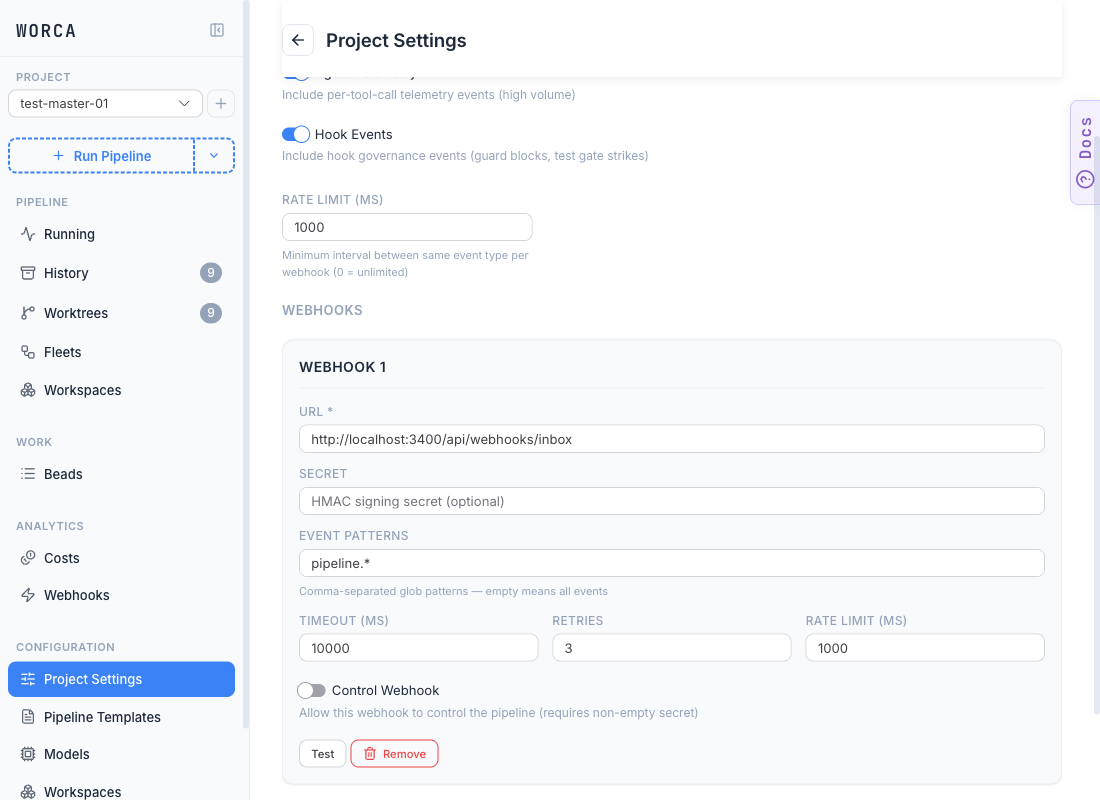
Per subscriber:
| Field | What it does |
|---|---|
| URL | The endpoint that receives the POST. Required. |
| Secret | HMAC signing secret. Routed to settings.local.json (gitignored) — see Secrets. |
| Event Patterns | Comma-separated fnmatch patterns (pipeline.run.*, workspace.*, a bare *). Empty means all events. |
| Timeout / Retries / Rate Limit | Delivery limits per subscriber. |
| Control Webhook | Toggle that promotes this subscriber to a synchronous control endpoint (see below). |
| Test | Sends a one-shot ping so you can confirm delivery without launching a pipeline. |
Above the subscriber list, the Event System controls let you toggle event emission as a whole (Events Enabled), include high-volume per-tool telemetry (Agent Telemetry), include hook governance events (Hook Events), and set the global Rate Limit (ms) — the minimum interval between same-event-type sends per webhook.
Delivery headers
Section titled “Delivery headers”Each POST carries headers you can route and verify on:
| Header | Value |
|---|---|
X-Worca-Event | the event_type string |
X-Worca-Delivery | the event_id (UUID) — use it to dedupe |
X-Worca-Signature | sha256=<hex> — present only when a secret is set |
Verifying the signature
Section titled “Verifying the signature”When a secret is configured, worca signs the body with HMAC-SHA256 and sends it in X-Worca-Signature. Verify it with a timing-safe comparison — recompute the HMAC over the raw request body with your shared secret and compare against the header. Never compare with a plain ==.
Control webhooks
Section titled “Control webhooks”Flip the Control Webhook switch on a subscriber to promote it from one-way delivery to a synchronous control endpoint. The switch is gated by the Secret field — without a non-empty signing secret it stays inert; the inline description in the screenshot above spells out the contract.
When enabled, the pipeline calls control webhooks synchronously at milestones and reads an action from the JSON response body:
{ "control": { "action": "pause" } }The action is pause, abort, or continue — letting an external system gate the pipeline, for example holding a run until a deploy window opens. (Only the response shape — what your endpoint must return — needs JSON here; everything on worca’s side is the UI toggle plus secret.)