Workspace runs
A workspace carries one prompt across interdependent projects, in the right order. Where a fleet sends the same prompt to independent repos, a workspace decomposes the prompt into per-project sub-plans, runs them tier-by-tier, runs cross-project integration tests, and opens linked PRs with dependency metadata.
Launch and control from the dashboard
Section titled “Launch and control from the dashboard”The simplest path is the dashboard. Register a workspace from the + add-project dialog (choose Workspace), manage its definition in Configuration → Workspaces, then launch from Run Pipeline ▸ Run Workspace — pick the workspace, enter the prompt, choose a planning strategy, and set concurrency. The detail page shows the dependency graph with propagation arrows and per-project run cards. That UI flow is covered in Fleet & workspace runs.
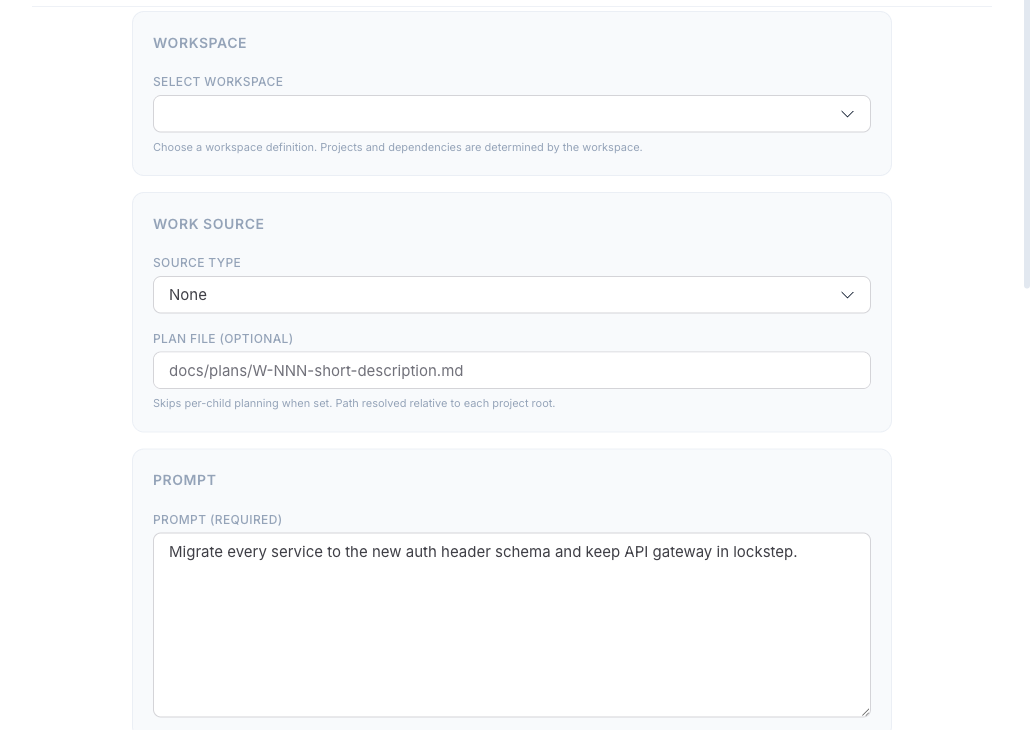
The rest of this page is the CLI and automation reference — the workspace.json schema, the full flag set, and the DAG/integration/PR mechanics.
Define the workspace
Section titled “Define the workspace”A workspace is a parent directory containing sibling project clones plus a workspace.json. Scaffold one by scanning the parent for git repos:
worca workspace init /path/to/parentThen edit workspace.json to declare dependencies and an optional integration test:
{ "name": "my-platform", "projects": [ { "name": "shared-lib", "path": "shared-lib", "depends_on": [] }, { "name": "backend", "path": "backend", "depends_on": ["shared-lib"] }, { "name": "frontend", "path": "frontend", "depends_on": ["shared-lib"] } ], "integration_test": { "command": "docker compose run integration-tests", "working_dir": "." }, "umbrella_repo": "org/my-platform"}The depends_on lists form a DAG. Projects are sorted into tiers: tier 0 has no dependencies, tier N depends only on earlier tiers. Projects in the same tier run in parallel; tiers run sequentially. Cycles are rejected at load time.
Launch
Section titled “Launch”python .claude/worca/scripts/run_workspace.py /path/to/parent \ --prompt "Add user authentication across all services"Inspect the DAG without launching anything with --dry-run. Key flags:
| Flag | Purpose |
|---|---|
--prompt / --source | The work request (mutually exclusive). |
--guide PATH | Normative reference guide, repeatable. See Guides. |
--branch TEMPLATE | Branch template — {workspace}, {project}, {slug}. Default workspace/{slug}/{project}. |
--max-parallel N | Concurrent children within a tier (default 5). |
--skip-integration | Skip the cross-project integration test. |
--dry-run | Print the DAG and exit. |
--resume WORKSPACE_ID | Resume a failed / halted / integration-failed run. |
Planning strategies
Section titled “Planning strategies”Four planning modes control where the per-project plans come from:
| Mode | Flag | What happens |
|---|---|---|
| Master planner (default) | (none) | An agent reads every project’s CLAUDE.md and the topology, then decomposes the prompt into per-project sub-plans. |
| Existing workspace plan | --workspace-plan PATH | Reuse a previously generated workspace-plan.json; skips the master planner. |
| Per-repo plans | --project-plan NAME=PATH | Seed plans from your own Markdown files (repeatable). Uncovered projects fall back to their own Planner. |
| Independent | --skip-planning | No master planner; each project plans for itself. |
--skip-planning can’t combine with the other two, and --workspace-plan / --project-plan are mutually exclusive.
How execution flows
Section titled “How execution flows”- Master planner decomposes the prompt (unless skipped).
- DAG execution — each tier’s projects run in parallel as standard worca pipelines. Between tiers, each completed project’s diff (API-surface files prioritized, capped at 8 KB) is injected as a
--guideinto the next tier’s children, so downstream projects know what upstream changed. - Integration test — after all tiers complete, the configured command runs in temporary worktrees of every child. Failure sets
integration_failedand no PRs are created. - PR linking — each child gets a PR titled
[workspace:<short>] <work_title>, with dependency comments (“Depends onorg/lib#15”, “Blocksorg/frontend#43”) and an umbrella issue listing all PRs in merge order.
Children run with PR creation deferred to the orchestrator, so they commit and push but the workspace opens the PRs after integration passes.
Resume and cleanup
Section titled “Resume and cleanup”python .claude/worca/scripts/run_workspace.py /path/to/parent --resume ws_202601011200_abc12345worca cleanup --workspace-id ws_202601011200_abc12345Resume skips completed children and re-dispatches failed/blocked ones; an integration_failed run just re-runs the integration test. See Worktree cleanup.
Workspace and fleet grouping in the dashboard require global mode.