Adding & routing models
Choosing which model each agent runs is a dropdown in the Pipeline Templates editor’s Agents tab (see Agents & models) — no JSON needed for day-to-day tuning. This page covers the layer beneath: the model profiles the dropdowns select from, and how you edit them entirely from the dashboard.
Agents reference models by short alias — opus, sonnet, haiku — and those aliases resolve through the top-level Models page. Each alias is a card where you change the model ID, set per-model environment variables, configure per-token pricing, and see which templates reference it.
What lives on a model alias
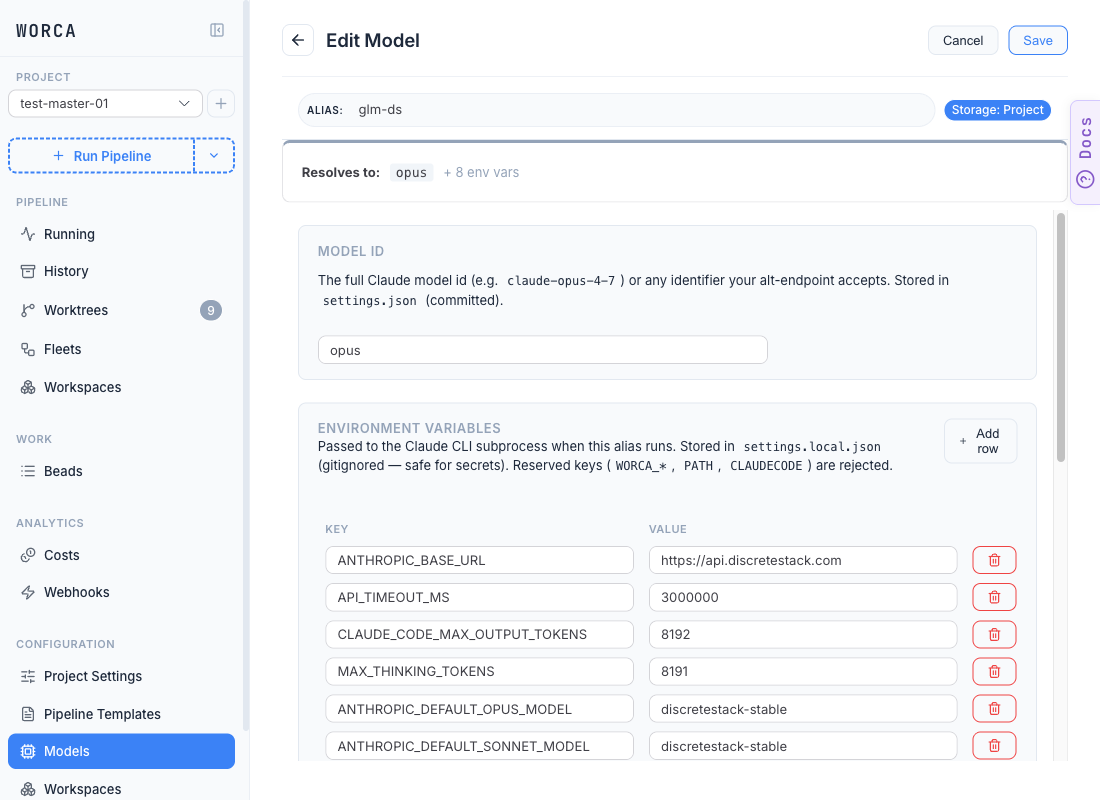
Section titled “What lives on a model alias”Open any project- or user-tier card on the Models page and the Edit Model editor shows three editable sections:
| Section | What it controls | Where it’s stored |
|---|---|---|
| Model id | The full Claude model id (claude-opus-4-7) or any identifier your alt-endpoint accepts. | settings.json (committed) |
| Environment variables | Variables merged into every agent subprocess that runs this alias. | settings.local.json (gitignored — safe for secrets) |
| Pricing | Per-token rates for cost accounting. | settings.json under worca.pricing.models.<alias> |
The id/env file split is enforced by the editor — secrets like ANTHROPIC_AUTH_TOKEN go to the gitignored side automatically. See Secrets.
Retargeting an alias
Section titled “Retargeting an alias”Because agents are configured by alias, pointing opus at a newer model upgrades every stage that uses it at once. Open the opus card and change the Model id field to the new identifier — claude-opus-4-7 to unlock the full effort ladder, or any other Claude model id. Save and every template referencing opus picks up the new target on the next run.
This is the cleanest way to swap a model platform-wide. See Tuning effort for why pointing opus at Opus 4.7 also unlocks xhigh.
Routing through an alternate endpoint
Section titled “Routing through an alternate endpoint”To send a model through a gateway, proxy, or alt-endpoint, fill out the Environment variables table on the alias card with whatever variables your endpoint expects. The screenshot above shows the glm-ds alias routed through https://api.discretestack.com:
ANTHROPIC_BASE_URL— the gateway URL.ANTHROPIC_DEFAULT_OPUS_MODEL/ANTHROPIC_DEFAULT_SONNET_MODEL— model identifiers the gateway expects.CLAUDE_CODE_MAX_OUTPUT_TOKENS,MAX_THINKING_TOKENS,API_TIMEOUT_MS— per-model tuning.
Aliases with an ANTHROPIC_BASE_URL in their env are flagged with an alt-endpoint badge on the Models list view. Reserved keys (WORCA_*, PATH, CLAUDECODE) are rejected on save — they belong to the pipeline runtime, not to a model profile.
Pricing — set rates per alt-endpoint alias
Section titled “Pricing — set rates per alt-endpoint alias”Claude CLI’s total_cost_usd reflects Anthropic prices, which don’t apply to a non-Anthropic endpoint. The Pricing accordion on each alias card lets you set per-token rates so worca’s cost accounting stays accurate:
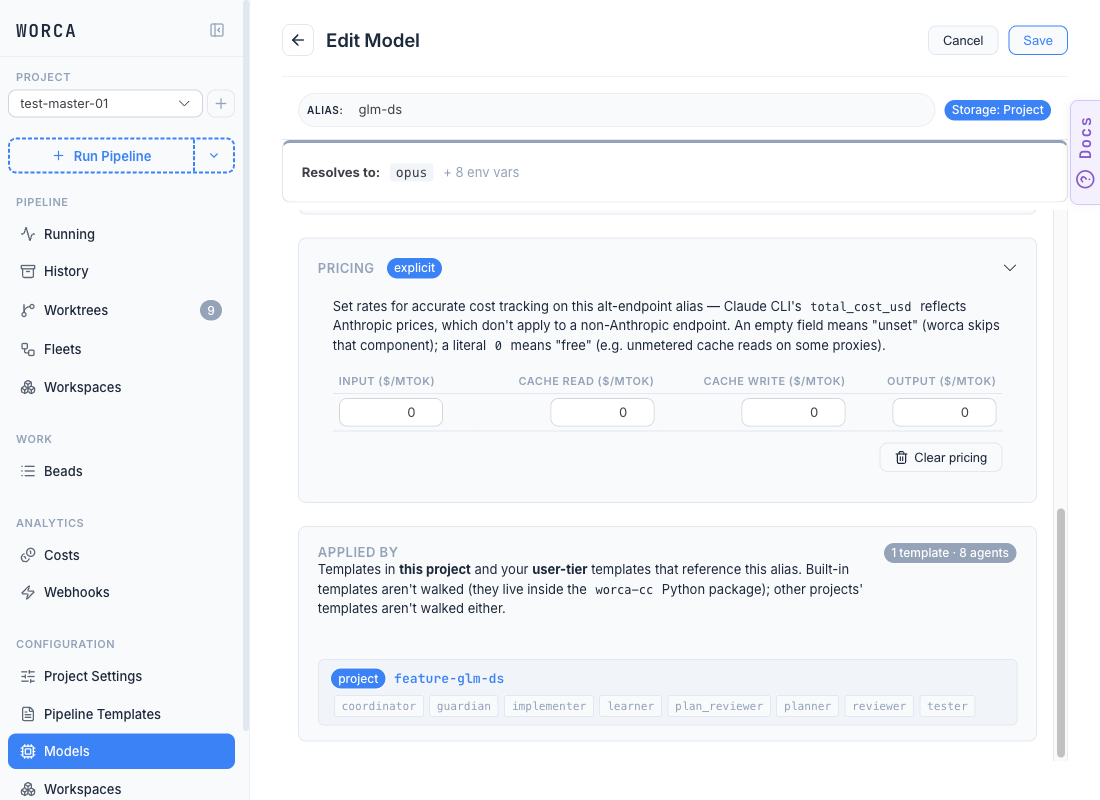
The card surfaces a small status badge above the table:
- explicit — you’ve set ≥1 per-token rate; worca uses your value.
- Claude CLI — default endpoint + no rates → worca trusts the number the CLI returns.
- no badge — alt-endpoint + no rates; the card’s alt-endpoint badge flags the missing-pricing risk.
The Applied by section below pricing lists every template that references this alias plus the agents inside it that pick it up — read-only, informational. It’s how you confirm which runs would be affected by an alias edit before you save.
Cross-tier resolution
Section titled “Cross-tier resolution”worca.models.<alias> and worca.pricing.models.<alias> resolve whole-entry, not field-merge — Project shadows User shadows Built-in in entirety. To customize a built-in alias’ env block, duplicate it to Project or User scope from the Models list view and edit the copy. Built-in aliases are force-synced on every worca init --upgrade, so direct edits never stick — the editor shows them in read-only View mode.
The Storage badge at the top of the editor tells you which tier you’re editing (the screenshots above show Project). Switching tier is done by duplicating, not by toggling the badge.
Three gotchas
Section titled “Three gotchas”- Secrets (API keys for an alternate endpoint) belong in
settings.local.json, never the committedsettings.json. The Models editor’s env table writes them to the right file automatically. See Secrets. - Reserved keys are stripped from any
envmap — anything matchingWORCA_*,PATH, orCLAUDECODEis dropped with a warning, so a profile can’t clobber the variables the pipeline depends on. <YOUR-SECRET-HERE>placeholders in an imported alias’ env block surface a danger Not configured badge on the card and a red-bordered value cell in the editor. Save stays enabled — fill the placeholder in and re-save.