Loops & circuit breaker
The pipeline retries work automatically, but never forever. Two mechanisms bound it: per-loop iteration limits and a circuit breaker.
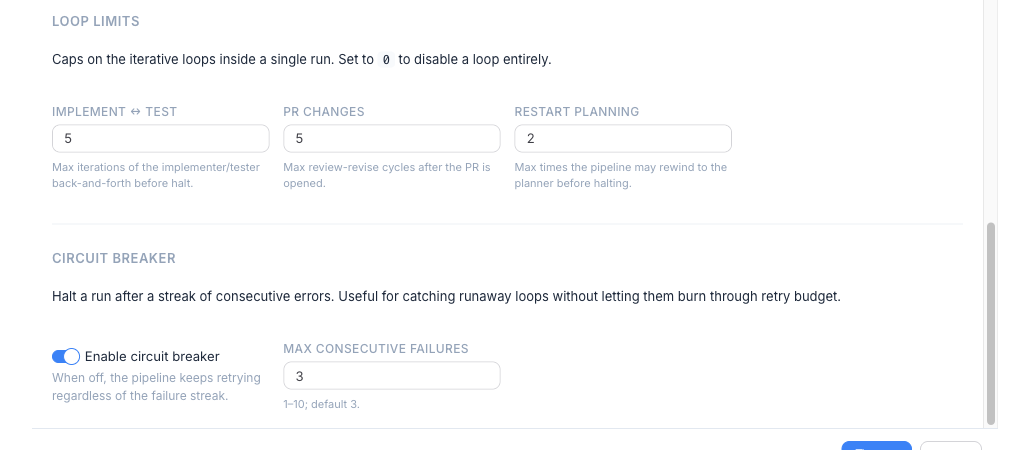
Loop limits and the circuit breaker live inside Pipeline Templates, not Project Settings — every run uses an active template, so the template owns the retry posture. To change them: open Pipeline Templates, edit your active template, and use the Pipeline tab.
Loop limits
Section titled “Loop limits”Three stages can send work back upstream:
- Test → Implement — the Tester loops back to the Implementer until the suite passes.
- Review → Implement — the Reviewer sends changes back when it finds issues.
- Plan Review → Plan — the Plan Reviewer returns a plan to the Planner on critical gaps (only when Plan Review is enabled).
Each loop has an iteration limit set in the template, so a stuck run can’t spin indefinitely. When a loop hits its limit, the run stops rather than burning tokens. The size / loop multipliers in the launcher scale these limits up for an unusually large task without changing the template defaults.
Circuit breaker
Section titled “Circuit breaker”The circuit breaker watches for repeated, classified failures and halts the run before it wastes budget on a broken setup. It’s configured in the template:
- Max failures — how many classified failures are tolerated before the run halts.
- Classifier model — the (small, fast) model that classifies whether an error is retryable or fatal. Set globally in
~/.worca/settings.json, defaulting tohaiku.