Settings overview
Every project’s configuration lives under a worca namespace in .claude/settings.json. You rarely edit that file by hand — the dashboard’s Settings panel writes it for you, and changes take effect immediately without restarting.
The Settings panel
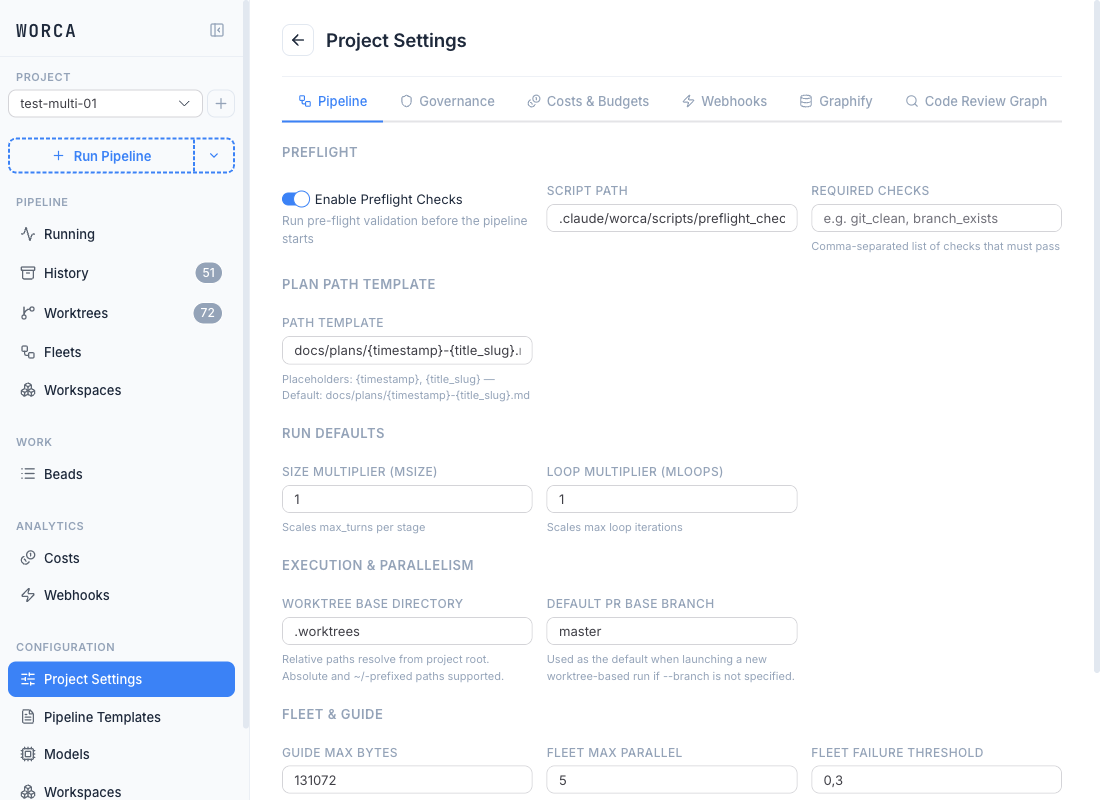
Section titled “The Settings panel”Open a project’s Settings — found in the sidebar under Configuration → Project Settings, alongside its siblings Pipeline Templates and Models — to configure the project-wide pipeline knobs that aren’t owned by a template: preflight, plan-path template, run defaults (size/loop multipliers), execution & parallelism, governance guards, costs & budgets, webhooks, integrations, Graphify, and Code Review Graph. All three Configuration entries are hidden in global all-projects mode until you select a project. Saves are written to .claude/settings.json and are effective on the next run.
Per-agent tuning (models, max turns, effort) and stage on/off lives in the Pipeline Templates editor, not here — every run uses an active template, so the template owns those keys. Per-alias model definitions live on the Models page. Project Settings covers everything that’s the same across templates.
Saves are locked while a pipeline is running to prevent mid-run config drift — finish or stop the run before changing settings.
Three places config lives
Section titled “Three places config lives”| File | Scope | Holds |
|---|---|---|
.claude/settings.json | Per project, committed | The bulk of worca config (stages, agents, governance, loops, webhooks). |
.claude/settings.local.json | Per project, gitignored | Secrets — API keys, tokens. Deep-merged over settings.json. |
~/.worca/settings.json | Global, all projects | Cross-project preferences: worktree cleanup policy, concurrency cap, disk-warning threshold, classifier model. |
The Preferences tab edits the global file; everything else edits the project file. If a project’s settings.json still carries keys that belong in the global file, the panel shows a one-click migration banner.
The per-key reference is in settings.json reference. For how these three files combine with user settings and named templates at run launch, see Configuration precedence.