Customizing dispatch governance
Beyond the always-on safety hooks described in Governance, worca lets you control exactly which tools, skills, and subagents each pipeline agent may dispatch. The whole model is editable from the dashboard.
Edit it in the template
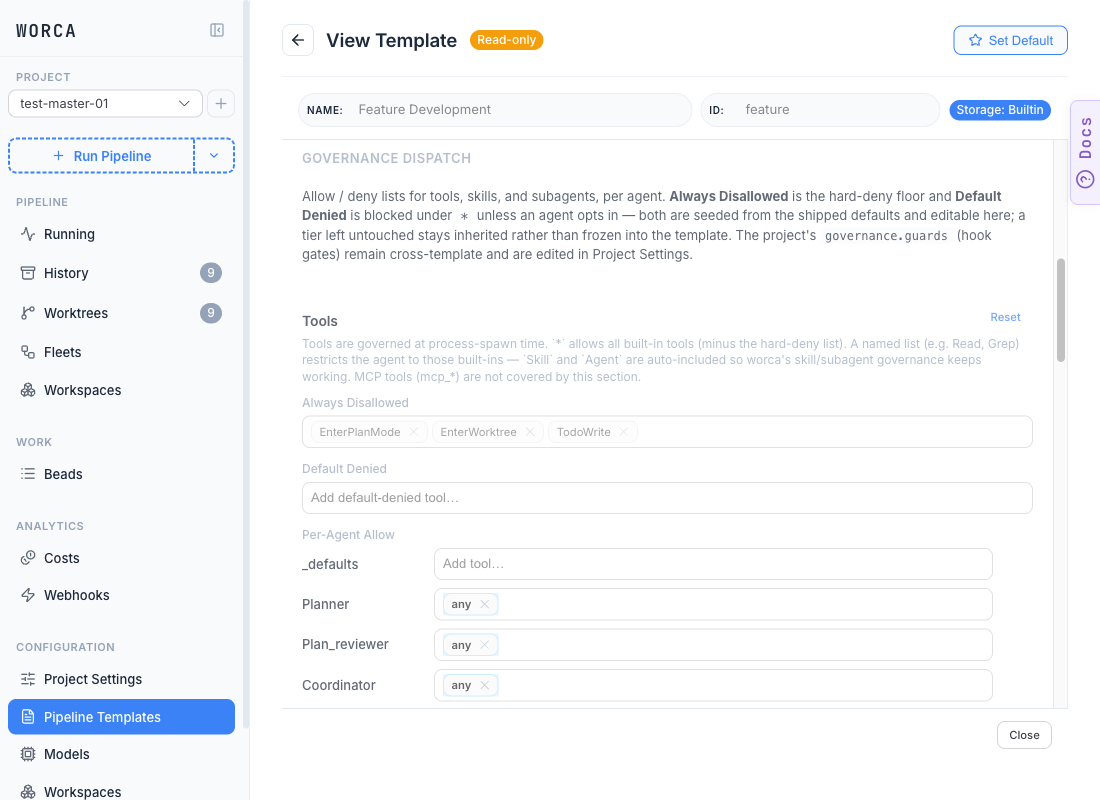
Section titled “Edit it in the template”Dispatch governance lives on each pipeline template’s Governance tab. Open the Pipeline Templates editor, pick the template you’re customizing, and scroll past Test Gate and Plan Review Enforcement to reach Governance Dispatch — one section per dispatch domain (Tools, Skills, Subagents), each with the same three-tier structure:
The run-detail view then shows each iteration’s actual dispatch decisions as allow (green) / deny (red) badges, so you can confirm a change took effect.
The rest of this page explains the model the chip editor writes to — useful for understanding precedence or when you’re scripting settings.json directly.
The three tiers
Section titled “The three tiers”Each section (tools, skills, subagents) has the same structure:
| Tier | Meaning |
|---|---|
| Always Disallowed | Hard deny. Editable, but rarely should be — these are footguns no agent should invoke. |
| Default Denied | Blocked unless an agent names it in Per-Agent Allow. The any wildcard does not include these. |
| Per-Agent Allow | Per-agent allow list, with a _defaults fallback row. |
The chip colours in the editor reinforce the tiers — gray for the locked Always Disallowed list, amber for the Default Denied opt-in tier, blue for per-agent allowances.
Resolution
Section titled “Resolution”For a given (section, agent, candidate):
- Matches Always Disallowed? → deny.
- Look up Per-Agent Allow for the agent, falling back to
_defaults. - If the row has
any(wildcard): allow anything not in Default Denied (a name listed explicitly opts in past Default Denied). - If the row has no
any: allow only names listed explicitly; deny the rest.
Interactive sessions (no WORCA_AGENT set) are never gated — this only applies to pipeline agents.
Examples — read the chip rows
Section titled “Examples — read the chip rows”A picture worth several JSON examples. The Skills section below shows three patterns at once — and these are all just chip-add operations in the editor:
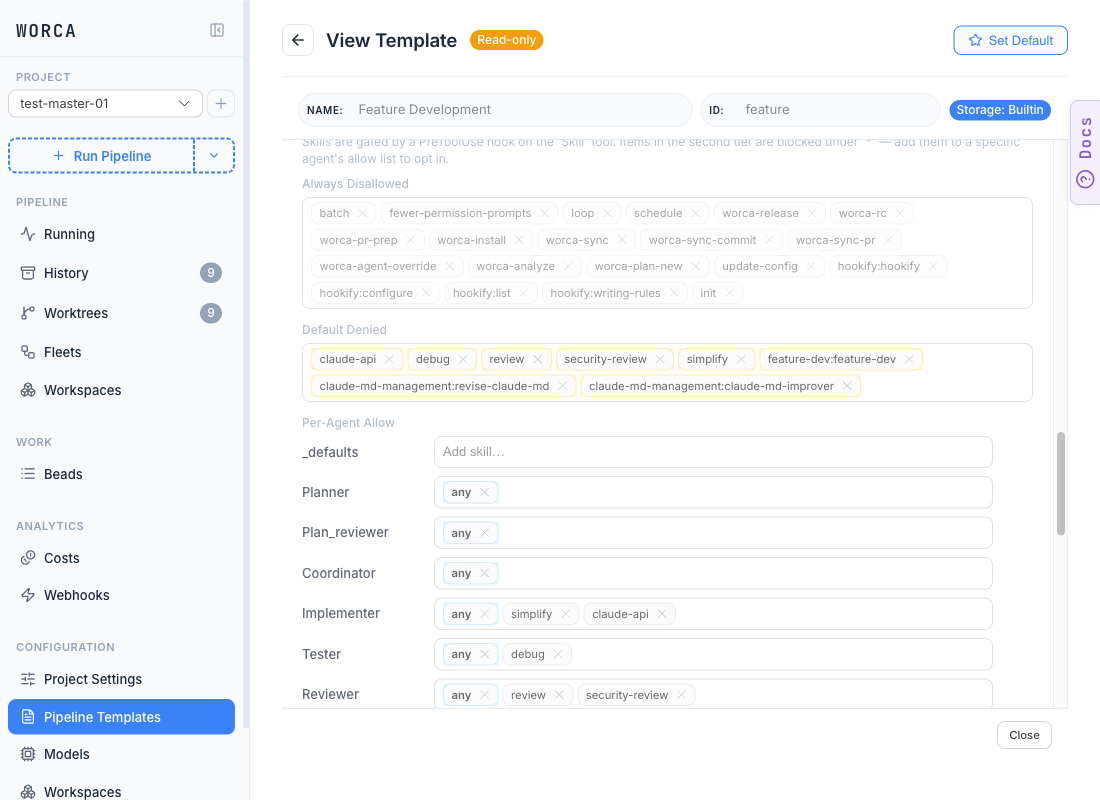
What each row says:
_defaults(empty) → any agent without an explicit row inherits the fallback. Empty means “use the implicitany.”- Planner / Plan_reviewer / Coordinator all have just the
anychip → wildcard, anything allowed except the deny tiers. - Implementer has
any · simplify · claude-api→ wildcard plus an explicit opt-in to two skills from the Default Denied tier. That’s how you grant a normally-blocked skill to one agent — add a chip with that name to its row. - Tester has
any · debug→ same pattern: wildcard plus opt-in to thedebugskill. - Reviewer has
any · review · security-review→ exactly the “let the reviewer use thereviewskill” example: add thereviewchip to the Reviewer row.
To lock an agent out of a section entirely, replace its row with a single none chip (the explicit lockdown sentinel). To restrict to a named subset (e.g. give the Reviewer only Read and Grep), remove the any chip and add only the names you want. A named tool list auto-includes Skill and Agent so worca’s own skill/subagent governance still fires.
What --tools does and doesn’t cover
Section titled “What --tools does and doesn’t cover”The Tools section maps to the agent subprocess’s --tools / --disallowedTools flags, which restrict only the built-in tool set. MCP tools (mcp_*) are not covered — they flow through separate channels and a named tool allowlist won’t block them.