Fleet runs
A fleet applies the same work request to N independent projects in parallel. Each target runs a full, standard pipeline in its own git worktree, on its own branch, opening its own PR — all grouped under a shared fleet_id.
Launch and control from the dashboard
Section titled “Launch and control from the dashboard”The simplest path is the dashboard’s Run Pipeline ▸ Run Fleet launcher — multi-select the targets, enter the prompt, attach a guide, and set concurrency. The fleet detail page then carries the lifecycle buttons (Pause / Halt / Stop / Resume / Cleanup) and a circuit-breaker banner. That UI flow, and how fleets group in the sidebar, is covered in Fleet & workspace runs.
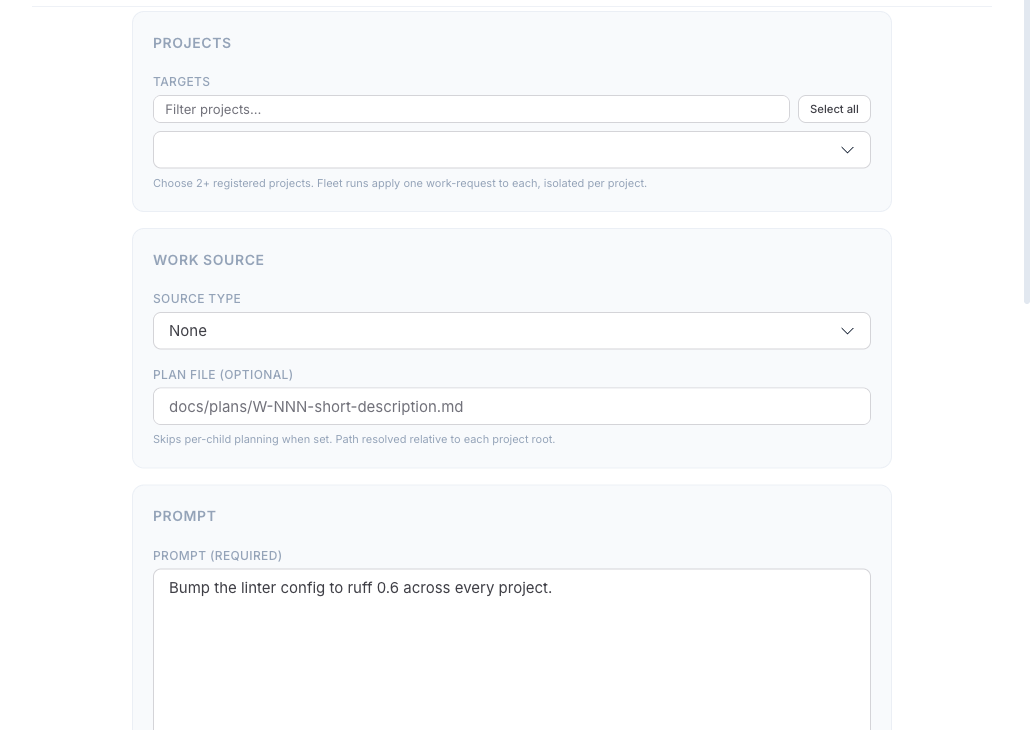
The rest of this page is the CLI and automation reference — the full flag set for scripting fleets in CI, plus the lifecycle and circuit-breaker semantics.
Launching from the CLI
Section titled “Launching from the CLI”python .claude/worca/scripts/run_fleet.py \ --projects /repos/frontend /repos/backend /repos/mobile \ --prompt "Apply the new authentication standard"Pass targets inline with --projects, or one-per-line via --projects-file repos.txt. Use --prompt for inline text or --source gh:issue:42 for an external reference (the two are mutually exclusive).
Targets must already be worca-ready
Section titled “Targets must already be worca-ready”Before dispatching, the fleet runs a read-only readiness check on every target: each must have a .claude/worca/ runtime on the same version as the fleet host. Any unready target aborts the entire fleet — nothing is dispatched.
The fleet runner never writes to a target project. To bring projects up to version, upgrade them yourself first. This loop upgrades every repo under a directory:
for p in /repos/*; do (cd "$p" && worca init --upgrade)doneBranch naming
Section titled “Branch naming”Fleet children need distinct branches to avoid PR collisions. Two flags control the two branch concepts — --head-template for the per-child branch agents commit to, and --base for the shared PR base:
python .claude/worca/scripts/run_fleet.py \ --projects /repos/frontend /repos/backend \ --prompt "Migrate to v2 API" \ --head-template "migration/v2/{project}" \ --base main--head-template placeholders: {project}, {fleet_id}, {slug}, {yyyymmdd}, {yyyymmddhhmm}. If none is present, /{project} is appended automatically. When --base is set, the fleet verifies that branch exists in every target before launching. --branch is rejected on fleets — use --base and --head-template.
Plan modes
Section titled “Plan modes”By default each child plans independently, producing N strategies. For fleet work you almost always want one strategy:
- Shared plan (recommended) —
--plan ./shared-plan.mdgives every child the same plan and skips their Planner stage. - Plan-first —
--plan-first [PROJECT]runs the Planner on one reference child, then hands that plan to the rest. - Independent — neither flag; each child plans for itself.
--plan and --plan-first are mutually exclusive.
Concurrency and the circuit breaker
Section titled “Concurrency and the circuit breaker”--max-parallel N caps concurrent children (default 5). The fleet circuit breaker halts unstarted children when failures pile up — once at least 3 children are terminal and the failure ratio crosses --fleet-failure-threshold (default 0.30), the fleet is marked halted and no new children start. In-flight children are never killed; they finish naturally. A deliberate stop never trips the breaker.
Both defaults (max-parallel and the failure threshold) are set in Settings → Fleet & guide; the flags here override them for a single invocation.
python .claude/worca/scripts/run_fleet.py \ --projects /repos/a /repos/b /repos/c /repos/d \ --prompt "Apply migration" \ --max-parallel 3 \ --fleet-failure-threshold 0.50Lifecycle: halt, pause, stop, resume
Section titled “Lifecycle: halt, pause, stop, resume”Three operator actions wind down an in-flight fleet; none of them launch new children:
| Action | Command | In-flight children |
|---|---|---|
| Halt | (UI) Halt | keep running until they finish |
| Pause | run_fleet.py --pause <fleet_id> | each stops at its next checkpoint, persists paused |
| Stop | run_fleet.py --stop <fleet_id> | each is signalled and persists interrupted |
Resume a halted / paused / failed fleet with --resume <fleet_id>: paused/interrupted children continue in place, while pending/failed children are re-dispatched fresh. Completed children are left alone.
python .claude/worca/scripts/run_fleet.py --resume f_202601011200_abc12345Fleet manifests live at ~/.worca/fleet-runs/<fleet_id>.json. The dashboard’s fleet detail view shows the ID in its header.
Cleanup
Section titled “Cleanup”worca cleanup --fleet-id f_202601011200_abc12345This removes every child worktree, their registry entries, and the fleet manifest directory (including uploaded guides). Cleaning up a resumable fleet makes it permanently unresumable — the UI warns first. Running children are never eligible. See Worktree cleanup.
Fleet events
Section titled “Fleet events”Five aggregated fleet.* events complement the per-child stream — fleet.launched, fleet.halted, fleet.completed, fleet.failed, and fleet.circuit_breaker.tripped. Subscribe to these instead of reconstructing fleet state from child events. See Webhooks and the Events reference.