Stages
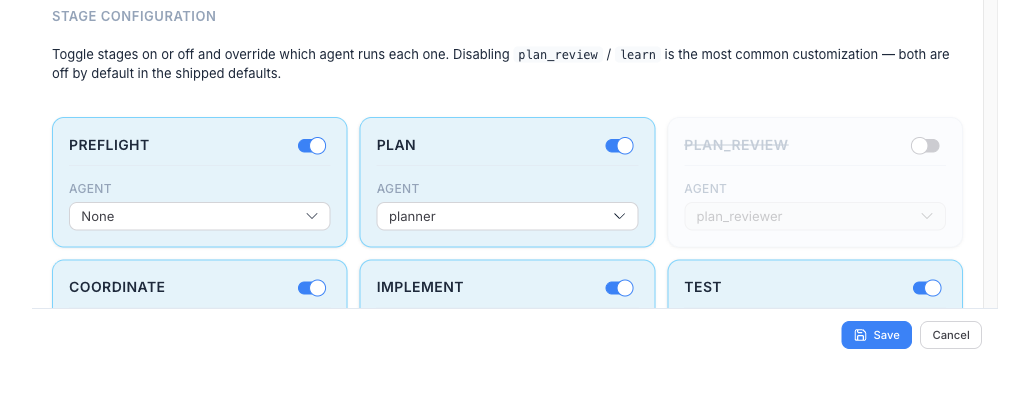
The pipeline’s nine stages are described in The pipeline & stages. Every stage except Preflight has an on/off toggle. (Toggling is the simple surface — reordering stages, rewiring loops, and adding custom stages is covered in Custom pipeline flows.)
Stage enable/disable lives inside Pipeline Templates, not Project Settings — every run uses an active template, and the template decides which stages run. To change the stage set: open Pipeline Templates, edit your active template, and use the Pipeline tab.
Off by default
Section titled “Off by default”Two stages ship disabled — turn them on for extra rigor:
| Stage | Turn it on when |
|---|---|
| Plan Review | You want a second agent to audit the plan for gaps before any code is written. Adds a Planner → Plan Reviewer loop. |
| Learn | You want a post-run retrospective with ranked, copyable suggestions after the PR. |
On by default — but a template can switch them off
Section titled “On by default — but a template can switch them off”The other stages start enabled, but “on by default” doesn’t mean “always runs” — the active template decides. Several built-ins disable stages to match their kind of work:
| Template | Stage set |
|---|---|
| quick-fix | Plan → Implement only — no Test, Review, or PR (the change is left on the branch). |
| investigate | Plan → PR, to publish a report — no Coordinate, Implement, Test, or Review (and Plan Review on). |
| feature / refactor | The full pipeline, with Plan Review and Learn enabled. |
So whether Test, Review, or PR runs depends on the template you launch with. See Pipeline templates.
Preflight checks
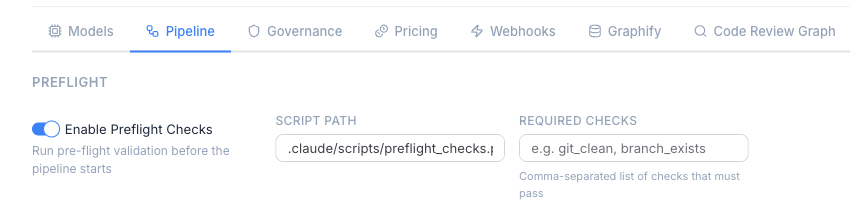
Section titled “Preflight checks”Preflight is the one stage without a simple agent toggle — it’s a script-based stage that validates the environment before any tokens are spent (git state, dependencies, configuration). Preflight is a cross-template carve-out: it lives in Project Settings → Pipeline → Preflight and applies regardless of the active template, so you can relax a check that doesn’t fit your project without touching every template.