Chat integrations
Chat integrations turn the event stream into readable messages in your team’s chat. worca ships adapters for Telegram, Discord, Slack, and a generic webhook.
The Integrations card catalog
Section titled “The Integrations card catalog”Open Settings → Integrations in the dashboard. The panel is a card catalog — one card per adapter with the live connection-health badges (polled every 10s while the tab is open), an Enabled toggle, and Edit/Remove buttons:
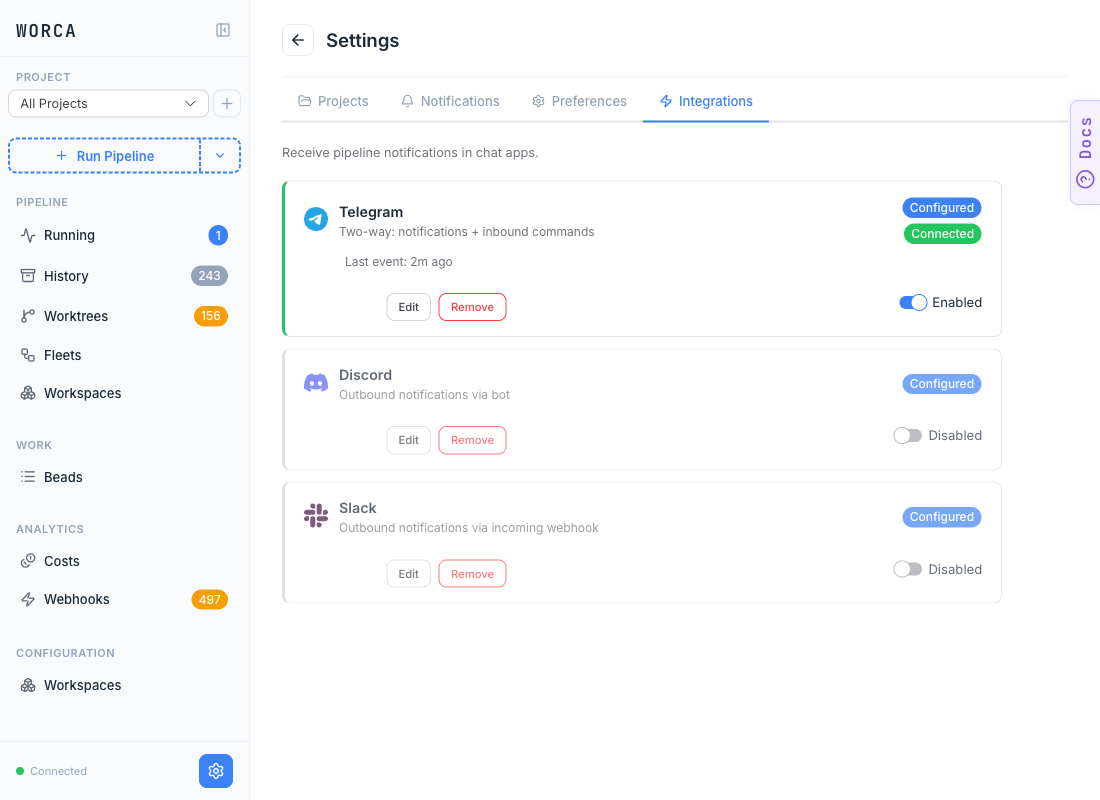
Each card surfaces:
- Configured badge — the adapter has the credentials it needs.
- Connected badge — the most recent send (or status poll) succeeded.
- Last event timestamp — when the adapter last delivered.
- Enabled / Disabled toggle — the master switch for that adapter, independent of the configuration.
Adding or updating a project also auto-configures its outbound webhook, so events route correctly with no manual wiring.
The adapter edit form
Section titled “The adapter edit form”Click Edit on any card to open its configuration form. The Telegram edit form below shows the shape — Discord, Slack, and the generic webhook follow the same pattern with platform-specific credential fields:
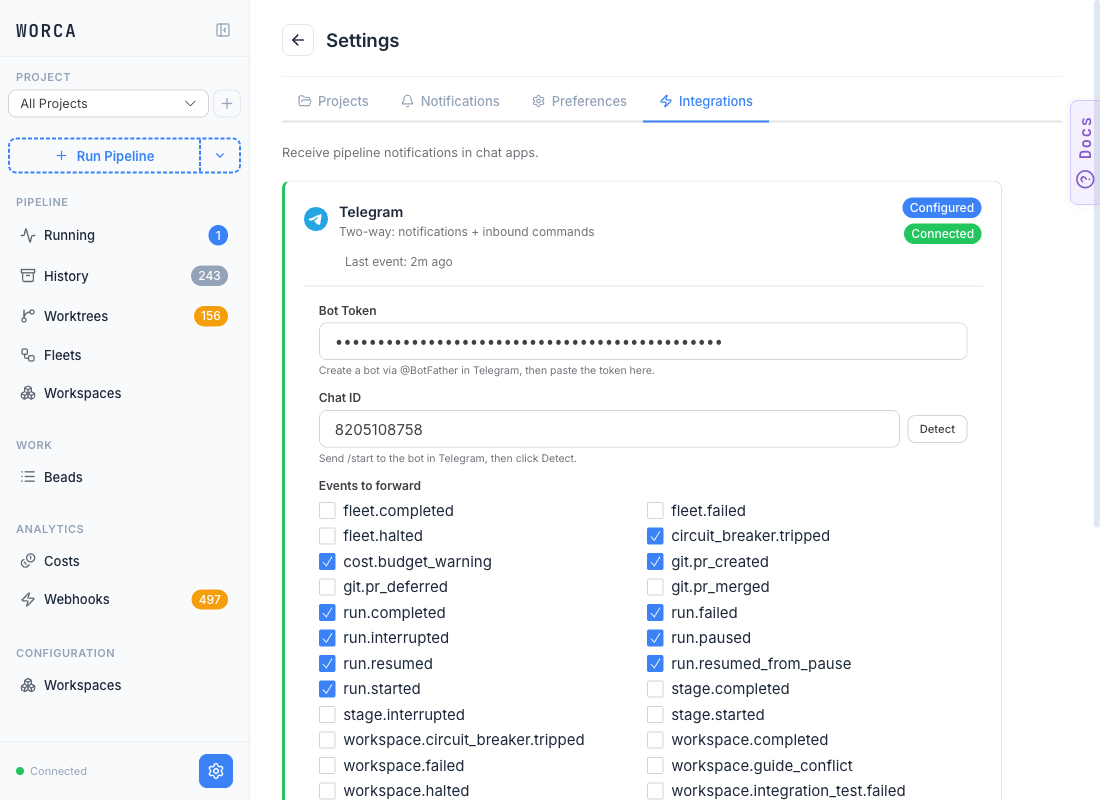
| Field | What it controls |
|---|---|
| Bot Token / Webhook URL / Bot credentials | The platform-specific credential. Stored against an env-var reference (see below). |
| Chat ID / Channel | Where to deliver. Telegram’s Detect button finds it after you send /start to your bot. |
| Events to forward | Per-adapter event filter. Check the events this channel should see. |
Save the form and the catalog card flips to Configured — flip the Enabled toggle on and the adapter starts delivering on the next event.
Secrets stay out of the config
Section titled “Secrets stay out of the config”Adapter credentials are never inlined. Each is referenced by the name of an environment variable — the form fields write to the gitignored settings.local.json automatically, and the validator rejects a config that inlines a token. See Secrets.
What gets sent
Section titled “What gets sent”Adapters render a curated subset of events into chat messages — not the full firehose. The default set centers on the moments a human cares about: run completed / failed / interrupted, PR created / merged, circuit breaker tripped, and budget warnings. The Events to forward checkbox grid on each adapter narrows it further per channel.
Send ad-hoc messages with /worca-notify
Section titled “Send ad-hoc messages with /worca-notify”Pipeline events fan out automatically through the adapters above. For everything else — “notify me when CI is green”, “ping me on Telegram with the comparison summary”, “alert me via Slack when X fails” — the /worca-notify skill sends through the same allowlist + rate-limiter + adapter pipeline, so messages render natively per-platform (HTML on Telegram, Markdown on Discord, mrkdwn on Slack) without any raw API calls.
In a Claude Code session in your project, trigger it by command or with a natural phrase:
/worca-notifyOr just say:
- “notify me when the deploy lands”
- “ping me on Telegram when CI is green”
- “send a chat message with the comparison summary”
- “alert me via Slack when the smoke test fails”
The skill does not fire on bare conversational phrases like “tell me when…” or “let me know what happens” — those keep the conversation going in your terminal instead.
What it does
Section titled “What it does”The skill runs a small Node shim at .claude/skills/worca-notify/send.mjs that POSTs to the worca-ui server’s /api/integrations/send endpoint. The server constructs a NormalizedMessage, dispatches it through integrations.sendOutbound(...), and runs the same per-adapter rendering, allowlist gate, and rate limiter the event fan-out uses. Per-platform results come back as {platform, ok, error?} entries, redacted of any leaked tokens.
Default targets are every chat adapter currently enabled in your Integrations panel. Pass --platform telegram (repeatable) to narrow the send. The skill never silently skips a named-but-disabled platform — you get an explicit per-platform error instead, so a misconfigured adapter doesn’t quietly swallow the notification.
Common shapes
Section titled “Common shapes”# Short message, defaults to all enabled adaptersnode .claude/skills/worca-notify/send.mjs \ --title "Build green" \ --severity success \ --text "CI for branch worca/foo-bar passed in 4m 12s."
# Multi-line body via stdin, Telegram onlycat <<'EOF' | node .claude/skills/worca-notify/send.mjs \ --title "Comparison results" --severity info --platform telegramGLM-DS #1: 6.5/10GLM-DS #2: 8.3/10Anthropic #1: 8.7/10EOFSeverity is one of info / success / warning / error and surfaces per-platform (color blocks on Slack, emoji on Telegram). Exit codes: 0 if at least one platform succeeded, 1 if every send failed, 2 for caller errors.
Requirements
Section titled “Requirements”The skill talks to the worca-ui server over loopback HTTP, so a few server configurations cause it to fail with a terminal status (not retryable):
| UI server state | Skill result | Fix |
|---|---|---|
| Not running | cannot reach worca-ui server | Start it: pnpm worca:ui |
Single-project mode (--project <path>) | HTTP 503 — integrations subsystem not initialized | Restart in global mode: pnpm worca:ui with no --project flag |
Non-loopback bind (HOST=0.0.0.0, --host <public-ip>) | HTTP 403 — send endpoint is restricted to loopback binds | Restart on a loopback bind (the default 127.0.0.1) |
Integrations subsystem enabled: false in config | HTTP 503 — integrations subsystem disabled in config | Enable via the Integrations panel and configure ≥1 adapter |
The loopback restriction is intentional: the UI server has no per-request auth, and exposing user-addressable chat to the LAN/internet would let any reachable host ping the configured Telegram/Discord/Slack channel.
Composing with autonomy primitives
Section titled “Composing with autonomy primitives”The skill is a one-shot send. Pair it with the autonomy primitives to build asynchronous monitoring:
/loop 5m <check + notify>— recurring condition check that pings when state changes.ScheduleWakeup+/worca-notify— one-shot timed notification (“ping me in 30 min if the deploy hasn’t started”)./schedule+/worca-notify— recurring cron-driven summary delivered to chat.
For the full argument list (--chat-id override, --ui-port, --ui-host, etc.) see the in-repo skill manifest at src/worca/skills/worca-notify/SKILL.md.