Code review graph (CRG)
worca can build a per-commit code review graph — a Tree-sitter AST graph of your codebase that the pipeline’s agents query through dedicated MCP tools during a run. It’s powered by code-review-graph (CRG), is opt-in, and ships off.
CRG is a sibling of Graphify: both are optional, advisory code graphs the agents consult for orientation. The difference is how agents reach them — Graphify is queried over the shell (graphify query …), while CRG is MCP-native: each agent gets a scoped set of structured tools like get_impact_radius, get_review_context, and detect_changes that map directly onto worca’s Plan → Implement → Review loop. Both engines can be enabled at once.
Why turn it on. Instead of reconstructing structure by reading files, agents call precise tools — what would changing this symbol affect, what’s the minimal context for this task, what changed since the base — and get fast, token-budgeted answers:
- Impact awareness →
get_impact_radius/get_affected_flowsshow a change’s blast radius before code is touched. - Focused reviews →
get_review_context/detect_changeslet the reviewer and tester see exactly what moved, including in-flight uncommitted edits. - Cheaper orientation →
get_minimal_context/get_architecture_overviewbeat reading a dozen files to learn how things connect.
CRG is purely local for structural builds (no LLM, no API key) and incremental (rebuilds in seconds). The graph is always advisory — orientation, never authority. When both engines are on they are co-equal peers at the graph rung (authority order: guide > plan > graph(s) > description).
| Mode | What it builds | Privacy & cost |
|---|---|---|
| Off (default) | Nothing — the pipeline behaves as if CRG weren’t installed. | — |
| Structural | A fully local AST graph: definitions, call paths, impact radius, communities. | Fully local — zero outbound LLM calls, no API key, no per-run cost. |
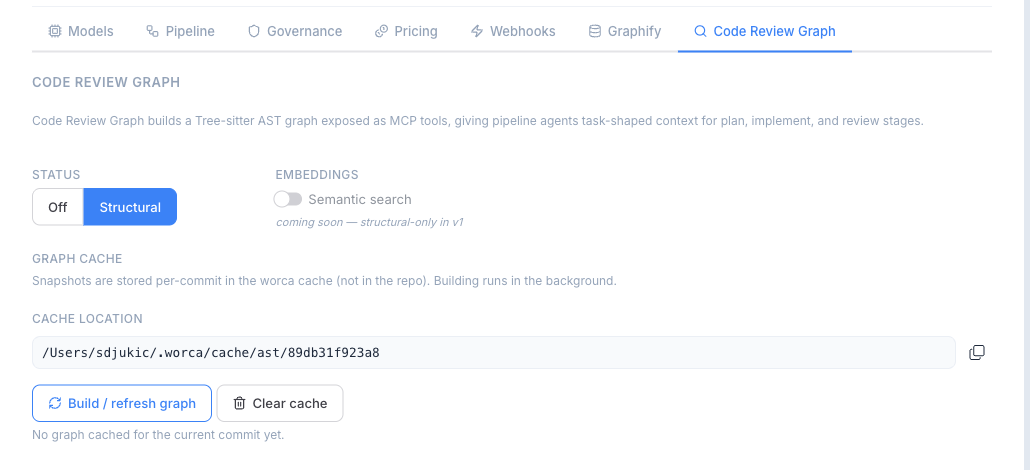
Structural is the only mode in v1. Semantic embeddings (semantic_search) are planned but not yet available — the Settings tab shows the embeddings toggle disabled with a “coming soon” hint.
Enable it from the dashboard
Section titled “Enable it from the dashboard”Open a project’s Settings → Code Review Graph tab and pick the mode:
- Select Off or Structural.
- The tab shows live detection — whether the
code-review-graphCLI andfastmcpare present — plus the cache location and Build / Clear controls.
You don’t need to build anything by hand
Section titled “You don’t need to build anything by hand”Once CRG is enabled, the Preflight stage automatically builds — or reuses — the per-commit graph at the start of every run. CRG’s heart is its handling of in-flight work:
- A base snapshot is built on the branch’s base commit, content-addressed in the shared per-commit cache (built once per commit, reused across runs and parallel worktrees).
- A run-scoped writable copy is seeded from the base for each run, and refreshed after every implementer iteration — so the tester, reviewer, and guardian query the current code, including uncommitted edits, not just the base commit.
The tab’s Build button is an optional convenience that pre-warms the current commit; Clear removes cached snapshots. You never have to click Build for a run to use the graph.
How agents use it
Section titled “How agents use it”During a run, each agent subprocess is given its own stdio MCP server (code-review-graph serve), injected as an inline --mcp-config. Which tools an agent can call is governed server-side per stage — the runner exposes only the tools that fit each role:
| Stage | CRG tools exposed |
|---|---|
| Planner / Coordinator | get_architecture_overview, get_minimal_context, query_graph, list_communities |
| Implementer | get_minimal_context, get_impact_radius, query_graph |
| Tester | get_impact_radius, detect_changes, get_affected_flows |
| Reviewer | detect_changes, get_review_context, get_impact_radius, query_graph |
| Guardian | detect_changes |
Mutating / code-editing tools are hard-excluded — agents can read the graph but never change code through it. Agents decide when to call these tools; nothing is forced into their prompts beyond a one-line “graph available” note.
When a graph is ready, each agent iteration in run detail shows a CRG: N invocation-count badge next to the Graphify: N badge. Hover the badge to see a per-tool breakdown — which MCP functions were called and how many times, one per line:
get_minimal_context_tool ×4get_impact_radius_tool ×2query_graph_tool ×1The Preflight stage shows a Code Review Graph: status pill on the same line as the Graphify pill — ready, skipped, unavailable (with the reason on hover), or off.
Governance
Section titled “Governance”The pre_tool_use hook blocks mutating CRG CLI verbs (build, update, install, serve, register, …) as defense-in-depth, in case an agent shells out to the CLI directly — the pipeline owns all graph builds. This guard is on by default (worca.governance.guards.block_crg_mutation). Tool exposure inside the MCP server is the primary control; the Bash guard is the backstop.
Installing the CLI
Section titled “Installing the CLI”CRG needs two packages — the code-review-graph CLI and fastmcp (a hard floor of >=3.2.4 for stdio reliability). worca checks both independently, so install them together; the Settings tab surfaces this exact command:
pip install 'code-review-graph>=2,<3' 'fastmcp>=3.2.4'Install into the same environment whose python3 runs your pipeline, and make sure both binaries land on PATH — the per-agent MCP server is spawned as code-review-graph serve. If code-review-graph is present but fastmcp is missing or too old, CRG reports degraded (“unavailable”) and the pipeline runs without it — never failing the run.