Knowledge graph (Graphify)
worca can build a per-commit code knowledge graph — a queryable map of your codebase (definitions, references, call paths, and dependencies) that the pipeline’s agents consult during a run. It’s powered by graphify, is opt-in, and ships off.
Why turn it on. Instead of grepping and guessing their way around an unfamiliar or large codebase, agents can ask the graph precise structural questions — where is this defined, what calls it, what would changing it affect — and get a fast, token-budgeted answer. In practice that means:
- Better orientation → more accurate plans and fewer edits to the wrong file.
- Cheaper exploration → one targeted query beats reading a dozen files to reconstruct how things connect.
- Impact awareness → the planner and reviewer can see a change’s blast radius (
affected,path) before touching code.
It pays off most on large or legacy repositories the agents don’t already “know.” The graph is always advisory — orientation, never authority (authority order: guide > plan > graph > description).
Graphify runs in one of three modes, chosen per project:
| Mode | What it builds | Privacy & cost |
|---|---|---|
| Off (default) | Nothing — the pipeline behaves exactly as if Graphify weren’t installed. | — |
| Structural | A fully local graph: definitions, references, call and dependency structure. | Fully local — zero outbound LLM calls, no API key, no per-run cost. |
| Full | Structural, plus an LLM semantic pass that enriches the graph with meaning. | Sends document and diagram summaries (never raw source code) to the configured model provider; needs a model profile with a provider key, and adds LLM time/cost at build. |
Structural is the safe default and is enough for most projects. Choose Full only when you want semantic enrichment and are comfortable with the summaries leaving your machine.
Enable it from the dashboard
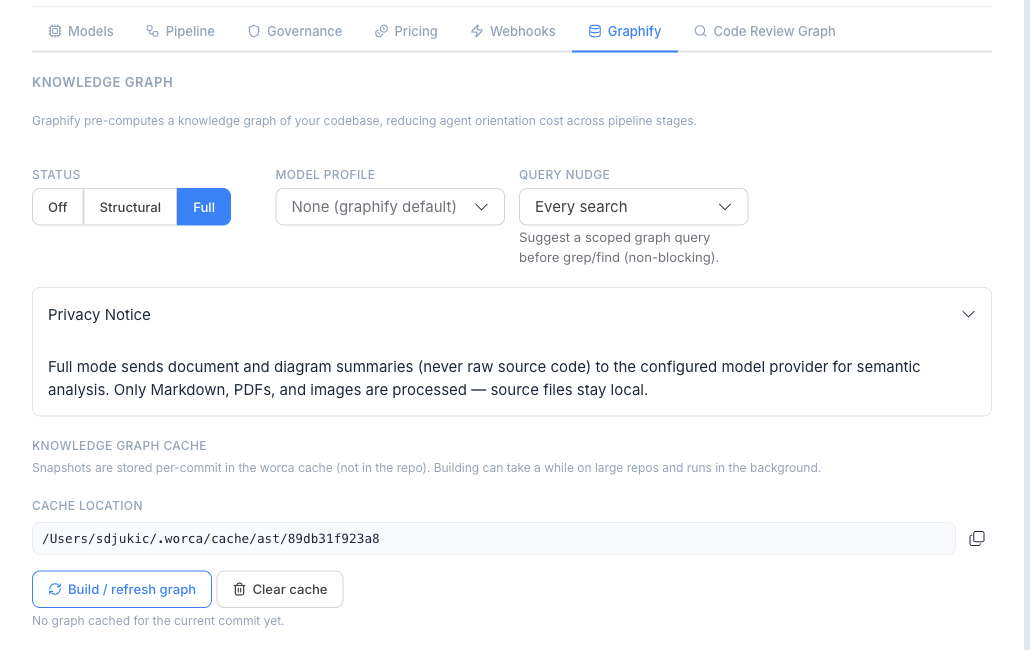
Section titled “Enable it from the dashboard”Open a project’s Settings → Graphify tab and pick the mode:
- Select Off, Structural, or Full.
- For Full only, choose the model profile that supplies the provider key for the semantic pass. (Structural needs no profile.)
You don’t need to build anything by hand
Section titled “You don’t need to build anything by hand”Once Graphify is enabled, the Preflight stage automatically builds — or reuses — the per-commit graph for the branch at the start of every run. Graphs are content-addressed by commit, so each commit is built once and reused across runs; worca also warms the cache after the guardian commits. You never have to click Build for a run to use the graph.
The tab’s Build button is an optional convenience — it pre-warms the cache for the current commit so you can browse the graph in the UI (the tab shows a human-readable report and a copy-able graphify query snippet) or skip the small first-run build delay. Clear removes the project’s cached snapshots. When a graph is ready, each agent iteration in run detail shows a Graphify: N query-count badge.
How agents use it
Section titled “How agents use it”During a run, every agent subprocess is given the graph’s location, so an agent can query it directly when useful — for example graphify query "what calls authenticate()". Agents are not fed a graph report in their prompts; each stage prompt carries only a one-line “graph available” note, and the agents decide when to consult it. Nothing is written into your working tree — the graph is cached outside the repo.
Governance
Section titled “Governance”The pre_tool_use hook lets agents read the graph (query, explain, path, affected, diagnose) but blocks mutating subcommands (update, install, add, …) — the pipeline owns all graph builds. This guard is on by default (worca.governance.guards.block_graphify_mutation).
Installing the graphify CLI
Section titled “Installing the graphify CLI”Graphify is a separate CLI you install once; the Settings → Graphify tab surfaces the exact command to copy. Install it with uv (or pipx) so the binary lands on PATH — note the PyPI package is graphifyy (double-y), but the command it installs is graphify:
uv tool install 'graphifyy>=0.8.16,<1'