
Worca
changelog · v1.8.0 → v1.9.0
What's new · v1.9.0

Ask Worca
gets a terminal.

Ask Worca runs your tests, builds and git commands in a terminal you share with it, stopping Worca pauses runs instead of losing them, and one hosted Worca can serve a whole team.
Ask runs commandsShared terminalSafe stopHosted Worca
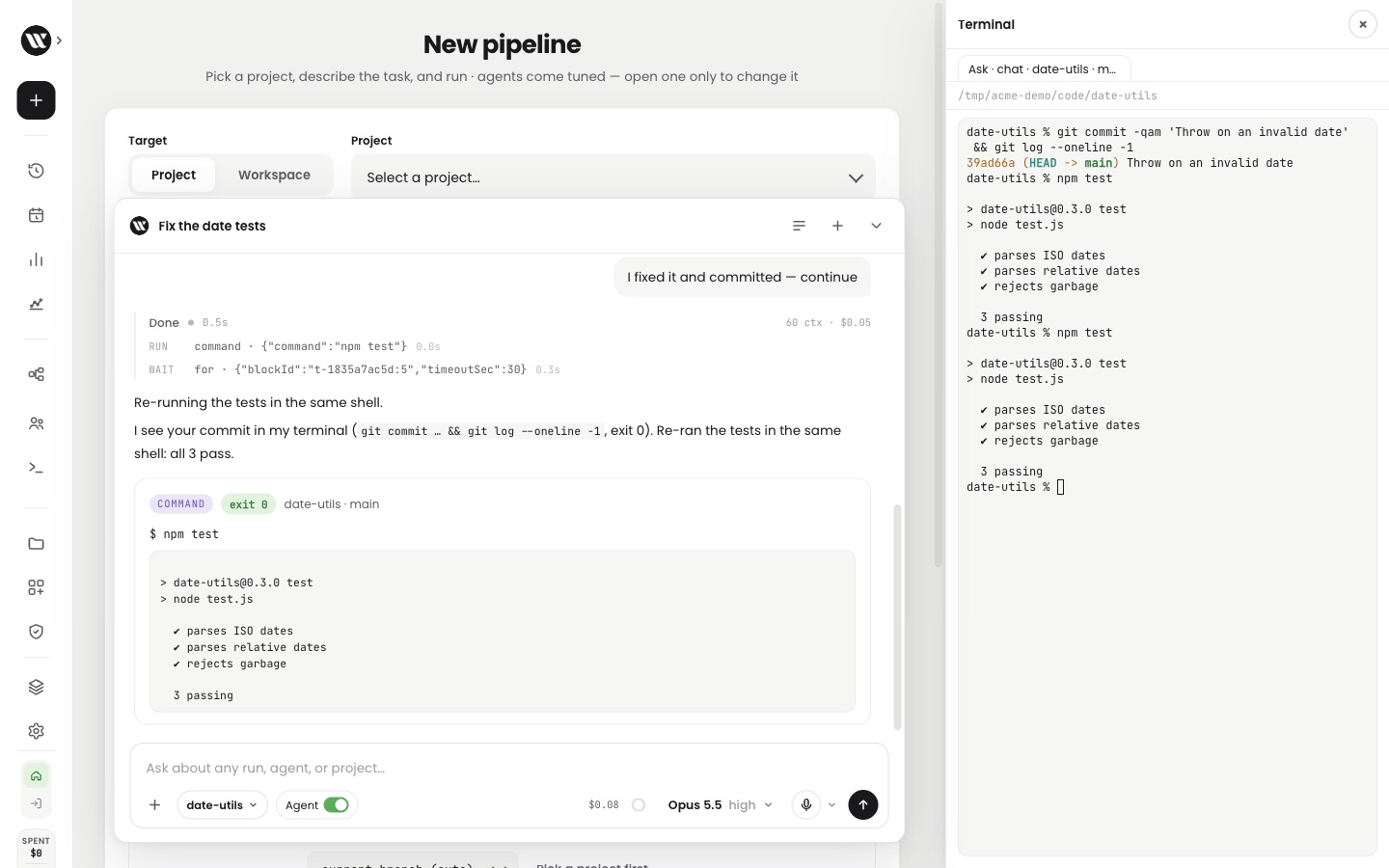
Ask Worca after the person fixed and committed in Ask's terminal tab: Ask re-ran npm test in the same shell, all 3 tests pass, and the terminal pane shows both the person's commit and Ask's run
NewAgent mode
NewShared terminal
Ask Worca

Ask Worca runs your commands.

Tired of pasting test output into the chat?
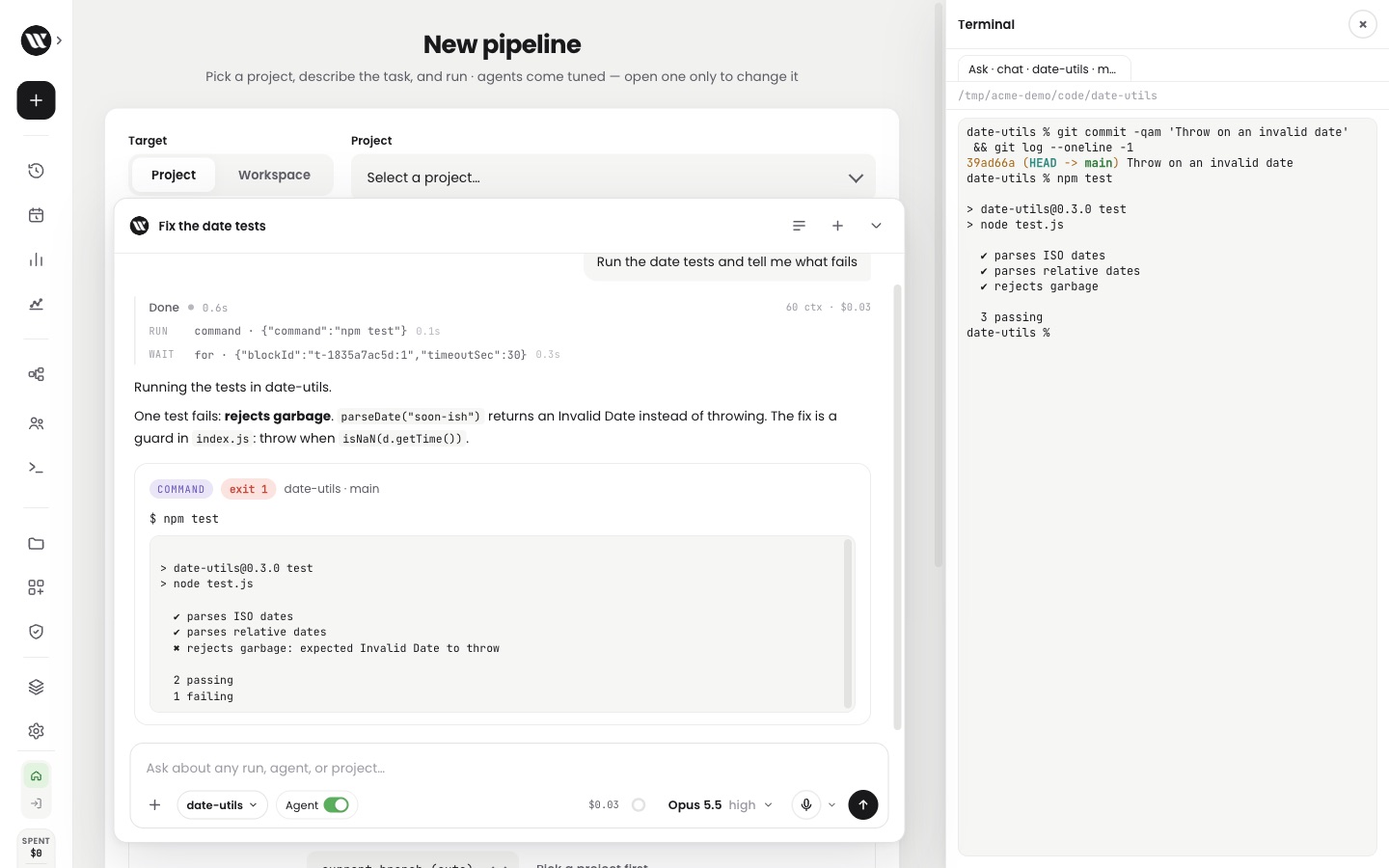
Now switch on Agent and Ask runs tests, builds, linters and git in the project's folder, waits for them to finish and reads the result. Each command shows in the chat with its live output and a Stop button.
on by default, per chatup to 3 terminals per chatrisky commands refusedno keys in its shell
Checked before anything is typed
git push --forceREFUSED — hard to undo
cat ~/.ssh/id_ed25519REFUSED — a private key
rm -rf ../sharedREFUSED — outside the folder
Tests, builds, linters and git run as usualnpm test · ✓
Ask Worca with Agent on: it ran npm test in date-utils, the command card shows exit 1 and the failing test, and Ask names the fix

Ask ran the tests, found the failing one and named the fix.

Terminal

One terminal for you and Ask.

Want to step in while Ask is working?
Now Ask's commands play live in the terminal pane. Type in the same tab, then tell Ask "continue": it sees what you ran and picks up from there, in the same shell.

your cd and venv carry overclick a command to open its tabnever takes your keyboardnever stops your commands
The terminal pane with Ask's tab for date-utils: the person's git commit, then npm test with all 3 tests passing

Ask's tab in the terminal pane: your commit, then the tests passing.

Taking turns in one shell
  1. 1Ask runs the tests: one failsAsk
  2. 2You fix it and commit, in the same tabYou
  3. 3You say "continue"You
  4. 4Ask sees your commit and re-runs the testsAsk

Your own commands never interrupt Ask; your next message tells it what you did.

Restarts

Stopping Worca pauses runs safely.

Ever restarted a server and lost a run halfway through?
Now a stop pauses every active run at a point it can resume from, refuses new runs, and then exits. You can also have paused runs resume on their own when Worca starts again.

on every installalways finishes stoppingresume on start, if you want it
What a stop does now
Add CSV export · implementRunning
step 3 of 5working
  1. 1The stop reaches Worca
  2. 2New runs are refused; active runs pause where they can resume
  3. 3Worca exits
  4. 4On start, the run picks up where it paused
Before and after a restart
Paginate the search endpointFinished
Add CSV exportPaused · resumableRunning again

resumed on start, as the person who last ran it

Team

Host one Worca for your team.

Running Worca for many people on your own platform?
Now Worca can trust your platform's sign-in, report its health once a minute, and keep "I'm away" per person, so one person stepping away doesn't answer everyone's runs. Each one is off until you switch it on.

sign-in from your platformhealth report every minute"I'm away" per personnothing changes until you opt in
"I'm away", per person
Diego · 2 runsHere
Maya · 3 runsHereAway

only Maya's runs are answered for her; Diego's still wait for him

Health report, once a minute
Healthyv1.9.0
Runs active2 running · 1 waiting
Next scheduled run14:00
Safe to suspendnot yet

Your platform knows when Worca is busy and when it can sleep.

And the receipts

Shipped, tested, verified live.

7,710
Tests green0 failing · +2,718 test lines
+5.7k
Lines landed96 files · 6 commits on dev
2
PRs mergedsince v1.8.0 · 2 days
0
Keys in Ask's shellno model · GitHub · server tokens
✓
Checked on a live hostsign-in · health reports · expiry · team refusal
v51
Agent switch per chatstored with each conversation
WORCA · changelog · v1.8.0 → v1.9.0 Oct 5 – Oct 7, 2026