
Worca
changelog · v1.7.0 → v1.8.0
What's new · v1.8.0

What's new
in Worca.

Worca answers your runs' questions while you're away, opens a terminal in any run's folder, calls the MCP servers you give it, and shows how full Ask Worca's chat is.
Away modeTerminalMCP serversContext ringArchived runsStop from the CLI
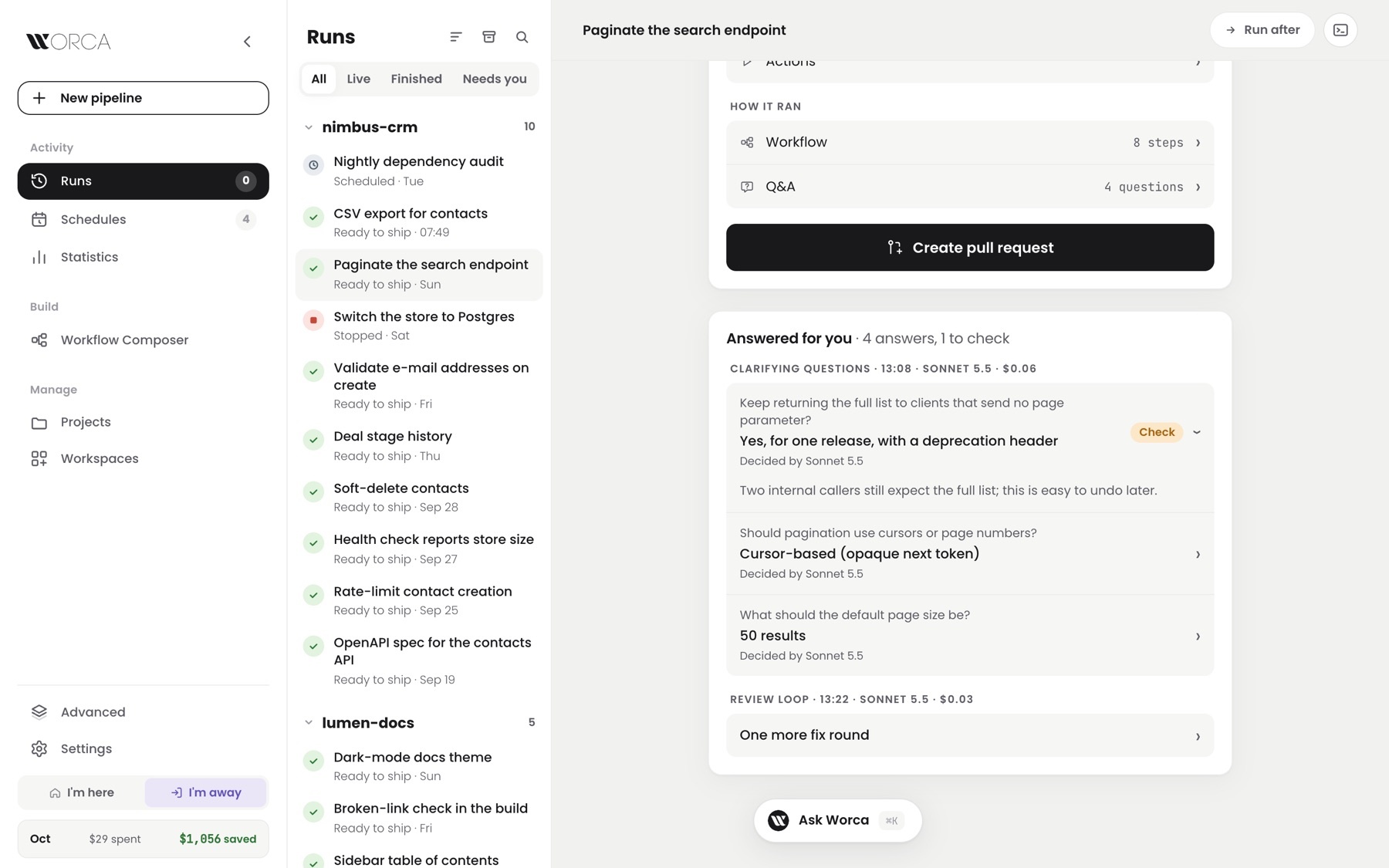
A finished run's Answered for you card — three clarify answers decided by Sonnet 5.5, one marked Check with its reason open, and one more fix round in the review loop
NewAway mode
NewAnswered for you
Away mode

Worca answers while you're away.

Ever come back to a run that sat for hours on one question?
Now every question comes with a recommended answer and how sure the agent is. Click I'm away, or set away hours, and Worca answers for you on the runs you allow. It writes down why, and marks the close calls for you to check.

the recommended answer is preselectedaway hours or one clickclose calls marked to checkpauses at your spending cap
While you're away
I'm hereI'm away
Cursors or page numbers?waiting…Cursor-based
Default page size?waiting…50 results
Keep the full list for old clients?waiting…Yes, for one releaseCheck

Every answer keeps its reason. You can still change course.
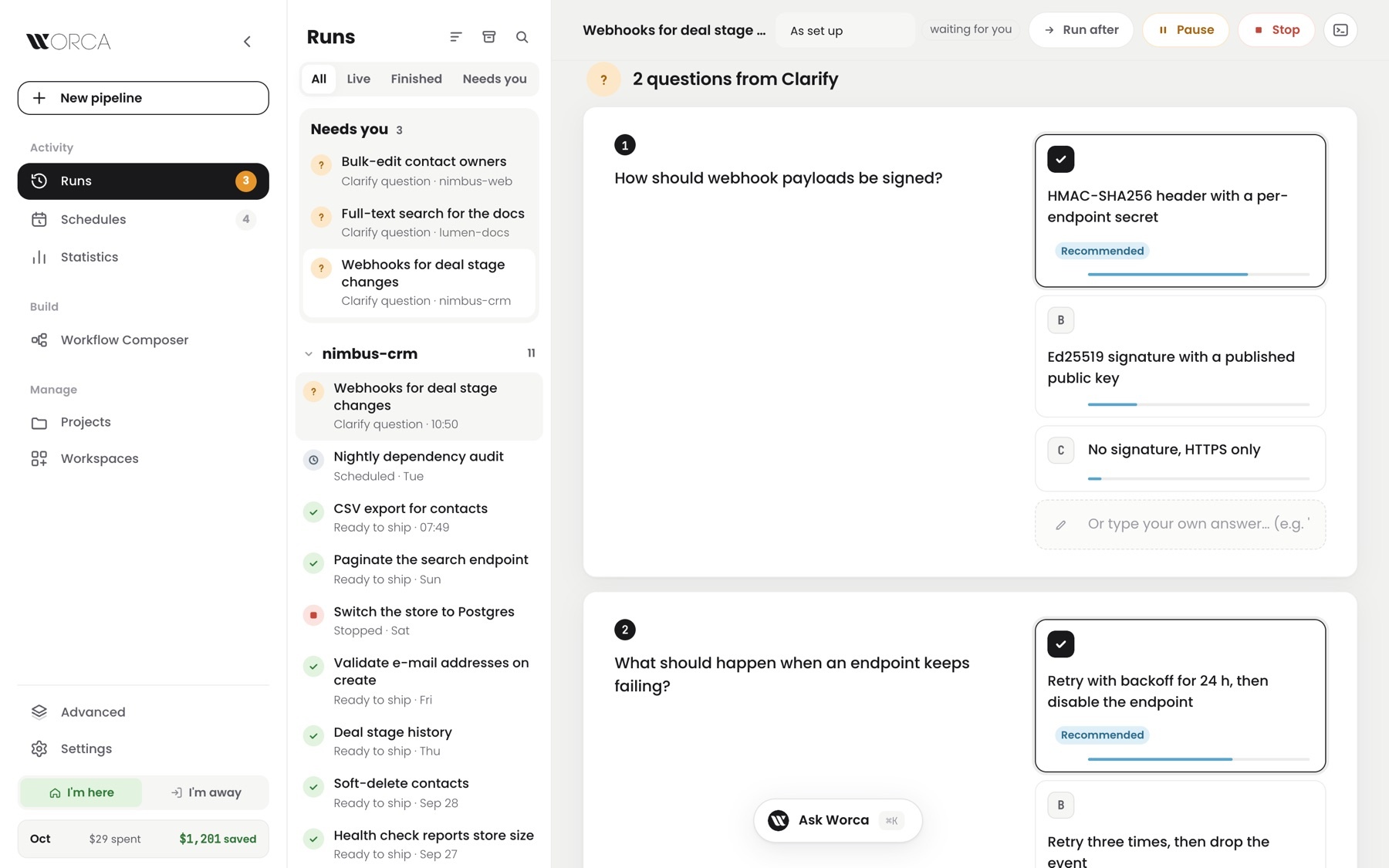
A live run waiting on two clarify questions — each option has a confidence bar, and the recommended one is preselected with a Recommended badge

A waiting run: how sure the agent is, and its pick already selected.

Terminal

A terminal in every run's folder.

Want to poke at what an agent just built?
Now a terminal opens right in the run's folder: a live run's worktree, a finished run's checkout, or your project. Hide the pane and the shell keeps running. A new Actions tab runs your project's own commands, like Test or Dev server, with live logs.
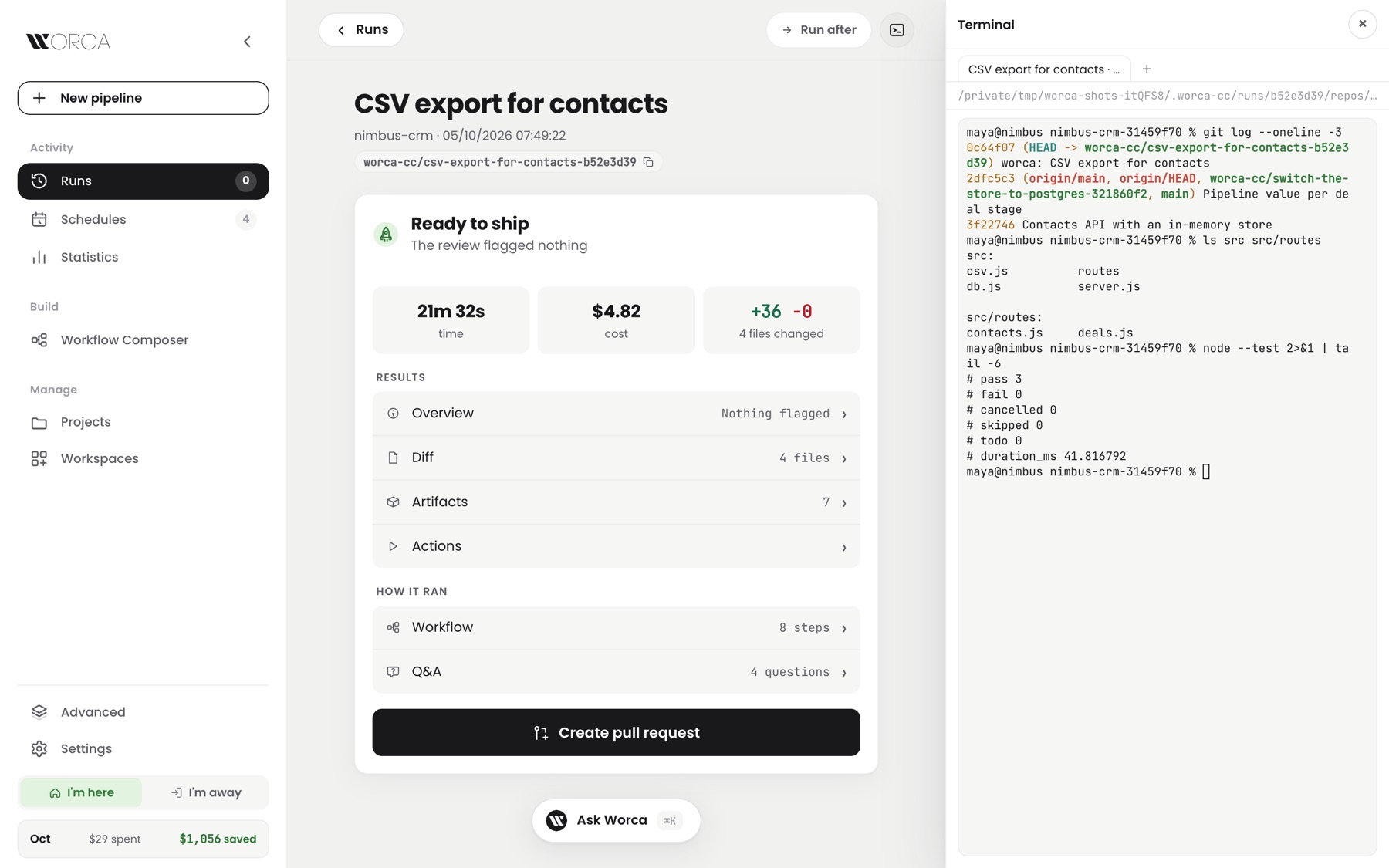
Ctrl+` on any page16 shells at oncefinished runs checked out on demandyour Test and Run commands, one click
A finished run's page with the terminal pane open beside it — git log, the run's files and a passing node --test in the run's checkout

The run's own checkout, in a shell next to its summary.

From a finished run to a shell
  1. 1Open a finished run
  2. 2Click the terminal icon
  3. 3Worca checks out the run's branch
  4. 4A shell opens in that folder
  5. 5Or press Test: the log streams in

A live run's shell warns you: its agents are still changing files.

MCP servers

MCP servers, built into Worca.

Want your agents to reach Jira, Notion or Cloudflare?
Now Worca keeps its own list of MCP servers, grouped in sets. Give a project the sets it needs, and its agents and Ask Worca can call those tools. Your own Claude Code setup is never touched.

5 ready-made pluginsTest lists a server's toolskeys stay hiddenswitch it off for one run
Which servers a project's agents can call
nimbus-crmnimbus-jobs
General every project
atlassiancloudflare-docs
Release tooling nimbus-crm · nimbus-web
railwaycloudflare

A set holds each server's settings and keys once.
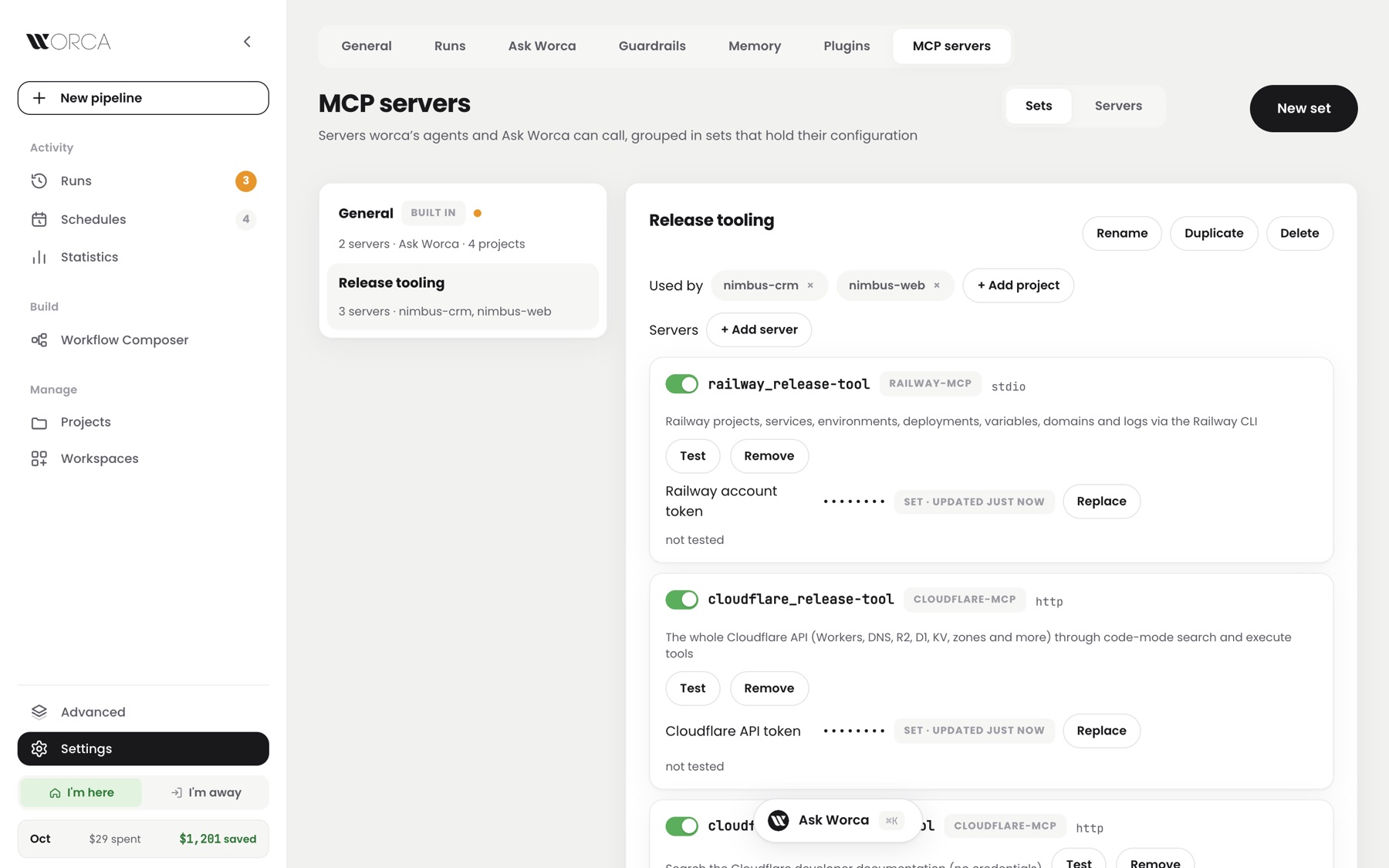
Settings, MCP servers — the Release tooling set used by two projects, with Railway and Cloudflare servers, their tokens hidden

Settings → MCP servers: a set, the projects using it, its servers.

Ask Worca

See how full the chat is.

Ever had a long chat suddenly forget what you said?
Now a small ring in the Ask Worca composer fills as the chat grows, and turns amber, then red. Click it to see how much is left before Worca compacts the chat, and which projects and runs the chat is about.
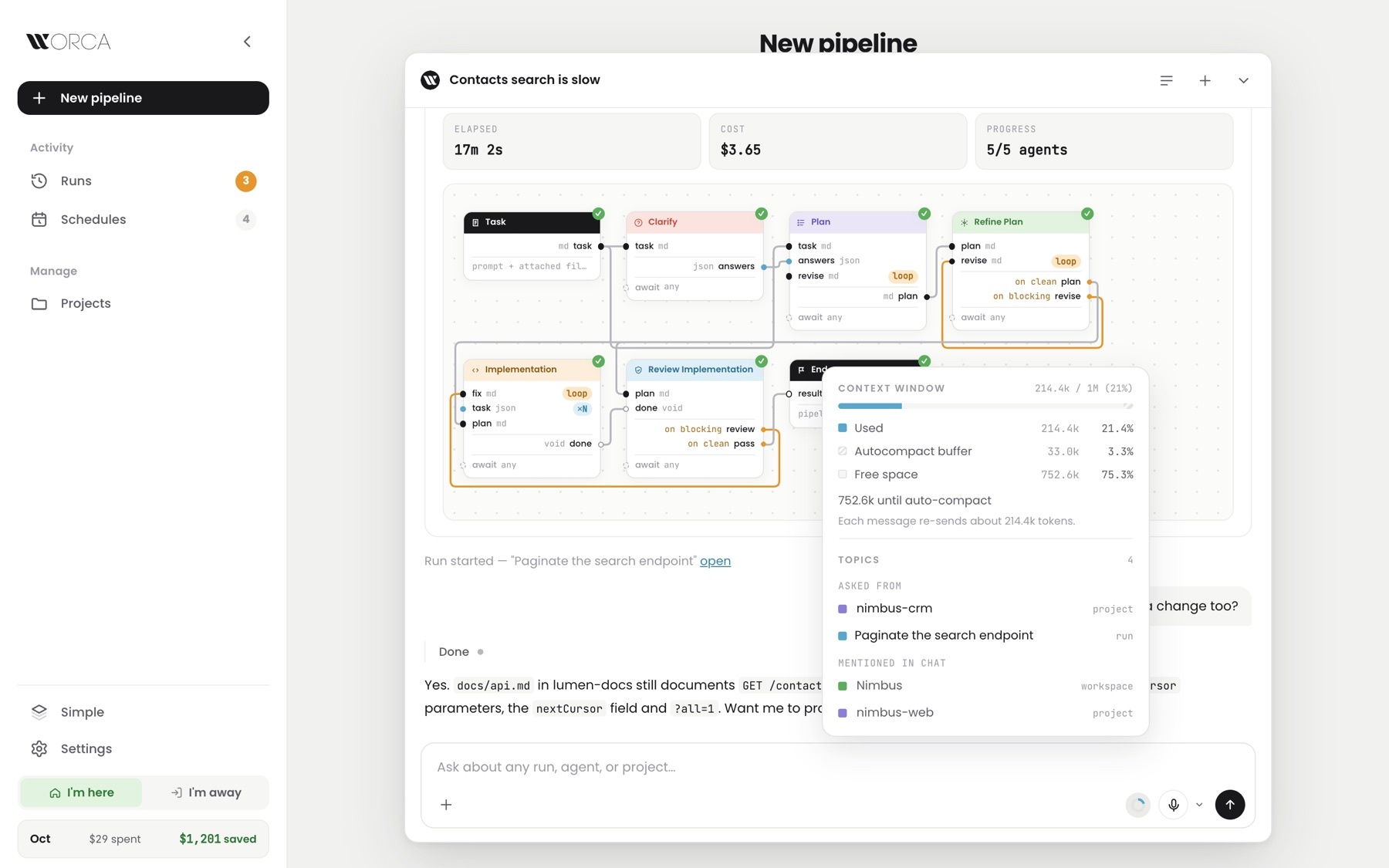
amber, then redroom left before compactingthe chat's topics, at a glance
Ask Worca with the context popover open — 214.4k of 1M used, the autocompact buffer and free space, then the chat's topics: asked from nimbus-crm and a run, mentioned Nimbus and nimbus-web

The ring's popover: the window, then what the chat is about.

The ring in the composer
Used 214kLeft before compacting 753k

Asked from

nimbus-crmproject

Mentioned in chat

Nimbusworkspace
Runs

Deleted runs can come back.

Deleted a run, then needed its answers?
Now a deleted run is archived, not gone. Open Archived on the Runs page and restore it, with its pull request link, answers, reviews and cost. Run pages also gain a branch chip you can copy, and Stop, Pause and Resume in one place.

restore keeps the historycopy the branch in one clickstart a run from a GitHub issue link
Archived, then restored
Health check reports store sizeArchived
Switch the store to PostgresArchivedRestored

PR link, answers, reviews and cost come back with it

Its files and branch are gone, so a restored run can't resume.
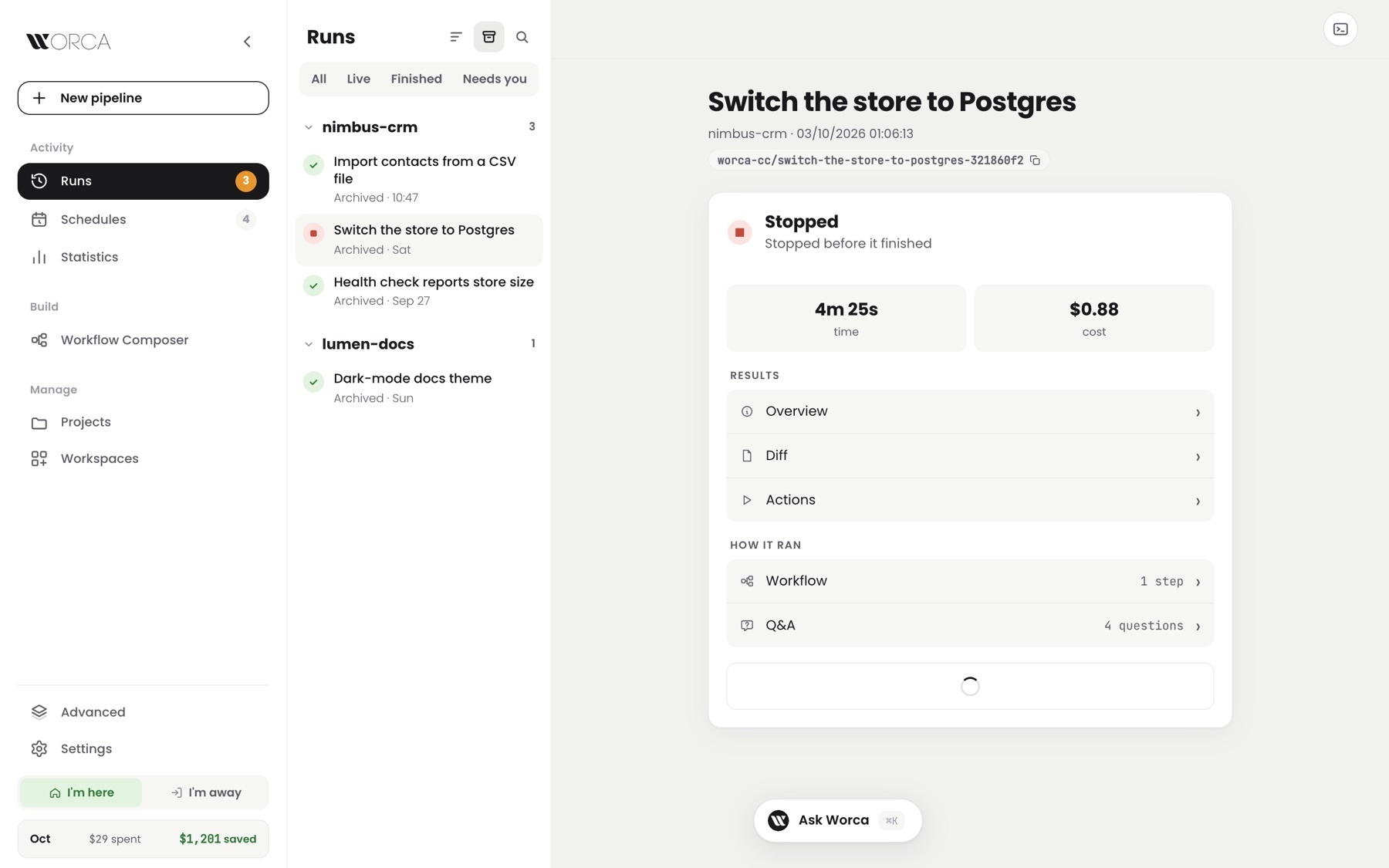
Runs page with the Archived filter on — four archived runs grouped by project, one open on the right

Runs → Archived: deleted runs, by project, ready to restore.

CLI

Stop and follow runs from the CLI.

Working in the terminal and need to stop a run?
Now worca stop, worca pause and worca resume take any run by the start of its id, even with the web UI closed. worca logs -f follows a run's live log.

no web UI neededthe first letters of the id are enoughCtrl-C leaves the run going
Pause a run, then resume it
$ worca runs
6160b59a running CSV export for contacts
$ worca pause 6160
paused CSV export for contacts
$ worca resume 6160
running CSV export for contacts
Follow the live log
$ worca logs 6160 -f
10:41:02 plan plan ready, 4 tasks
10:41:40 implement src/csv.js written
10:42:15 implement npm test: 3 passed
10:42:31 review reviewing the diff…
10:43:05 review no blocking issues
And the receipts

Shipped, tested, verified live.

7,550
Tests green1,046 test files · 0 failing
−38%
Faster test suite362 s → 226 s · a third fewer, sharper tests
+103.9k
Lines landed1,177 files · 40 commits
31
PRs mergedsince v1.7.0 · 4 days
0
Reads of your real settingswhile the tests run · was ~24,700
5
Fixes you'd noticea stuck git lock no longer loses a run's commit · clear feedback on every save
WORCA · changelog · v1.7.0 → v1.8.0 Oct 1 – Oct 5, 2026