Worca
changelog · v1.4.0 → v1.5.0
What's new · v1.5.0

What's new
in Worca.

A Timeline for the people who plan the work, and what a team needs to run one Worca together: sign-in, who did what, a container, and a clone button.
TimelineEvery pull requestShared WorcaClone from URLContainer
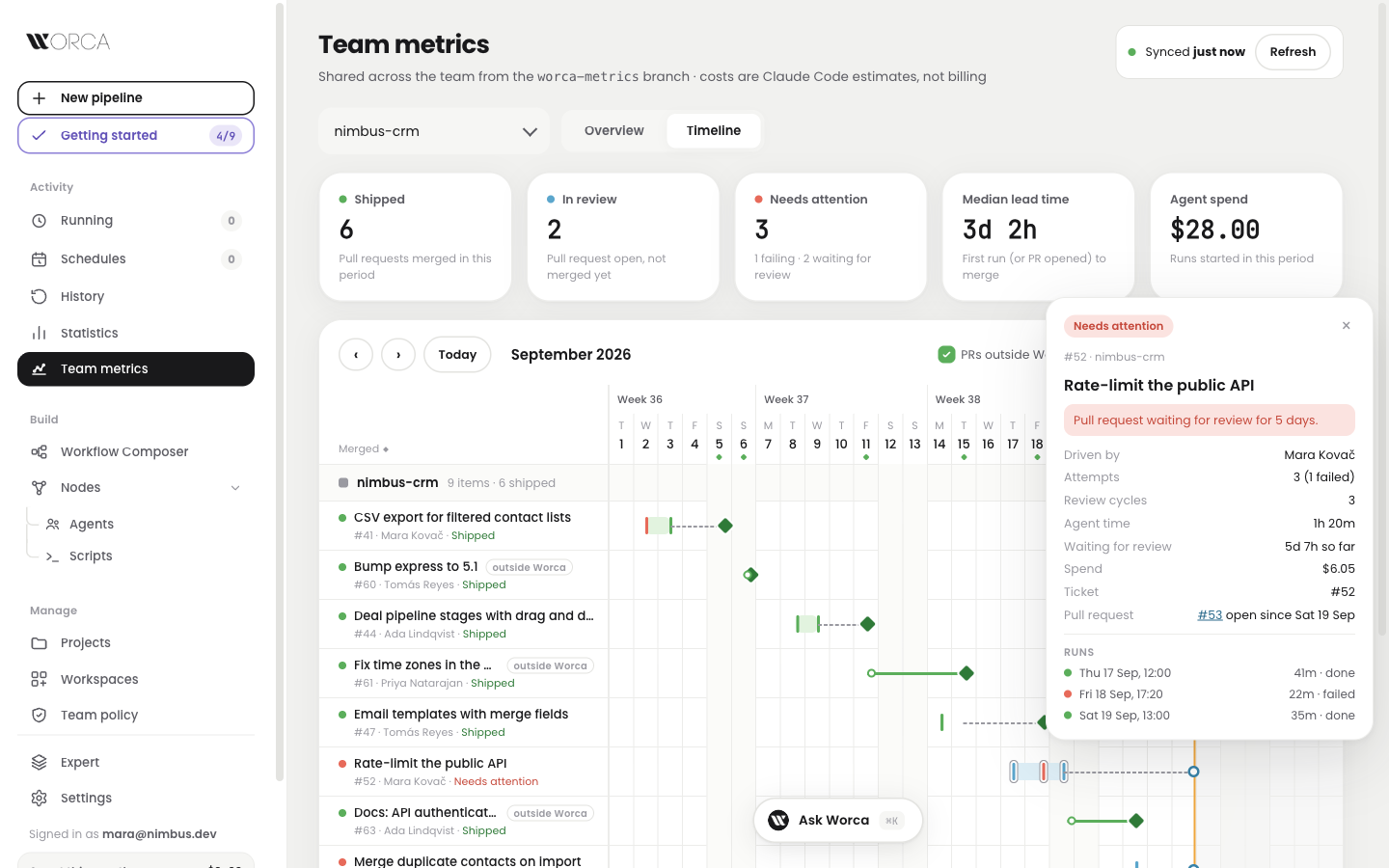
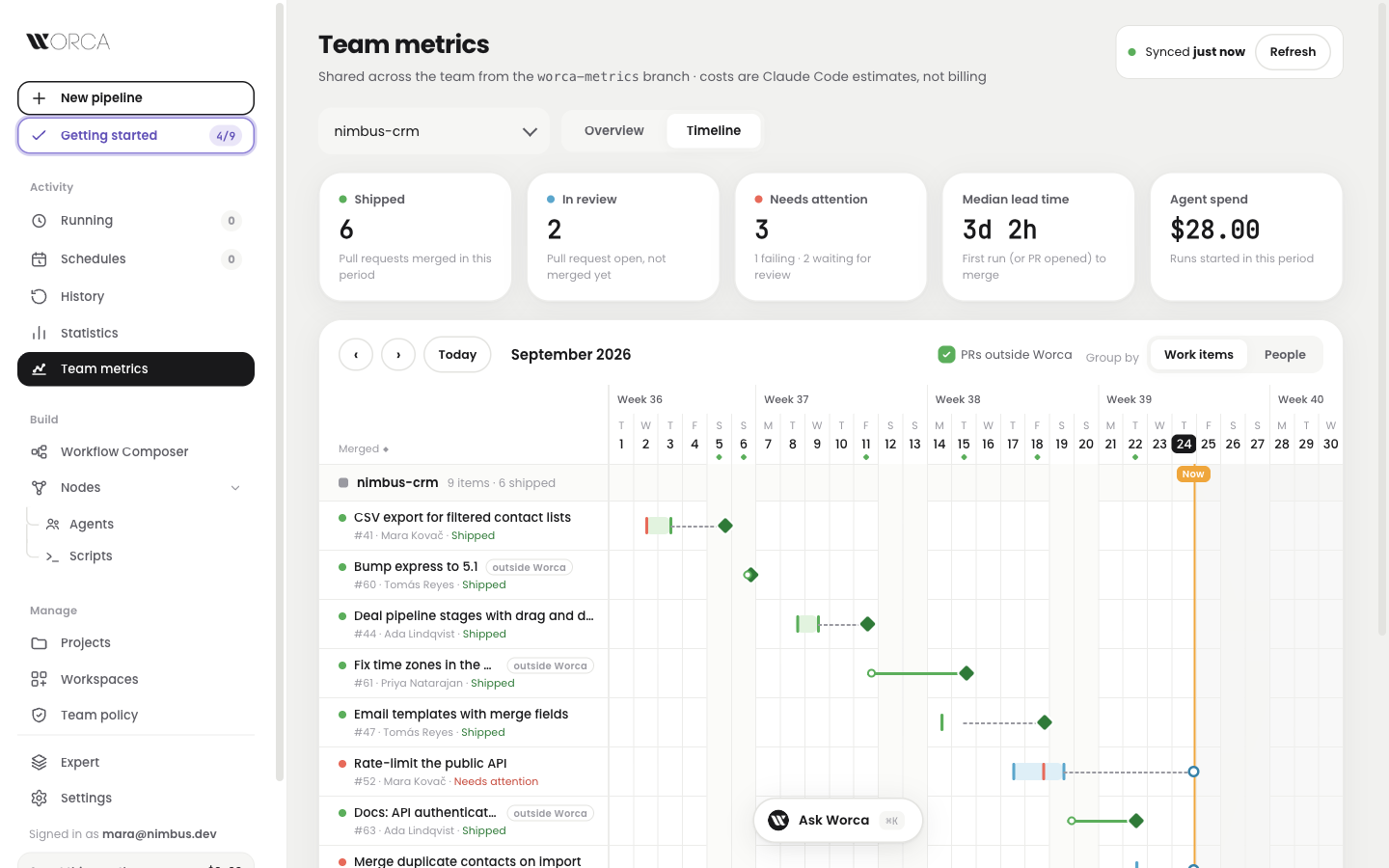
Team metrics, Timeline tab — a month of work items with runs, waiting pull requests and merges
NewTimeline
NewShared sign-in
Team

See team delivery on a timeline.

What shipped this month, and what is stuck?
Now Team metrics has a Timeline. Each ticket is a bar from its first run to its merge, with tiles for what shipped, what is in review and what needs attention. Zoom from month to week to day.

shipped means the PR mergedzoom from month to dayflags reviews waiting 2+ daysclick a bar for the whole story
One ticket, from first run to merge
Rate-limit the public APIAgent working
  1. 1Runs fill the bar (red: one failed)
  2. 2The pull request waits for review
  3. 3The merge marks it shipped
Timeline — the detail card of a work item: attempts, review cycles, agent time, waiting for review, spend and its three runs

Click a bar: who drove it, attempts, time waiting for review, spend and every run.

Team

Every pull request counts, even outside Worca.

Most of the team's work never touched Worca?
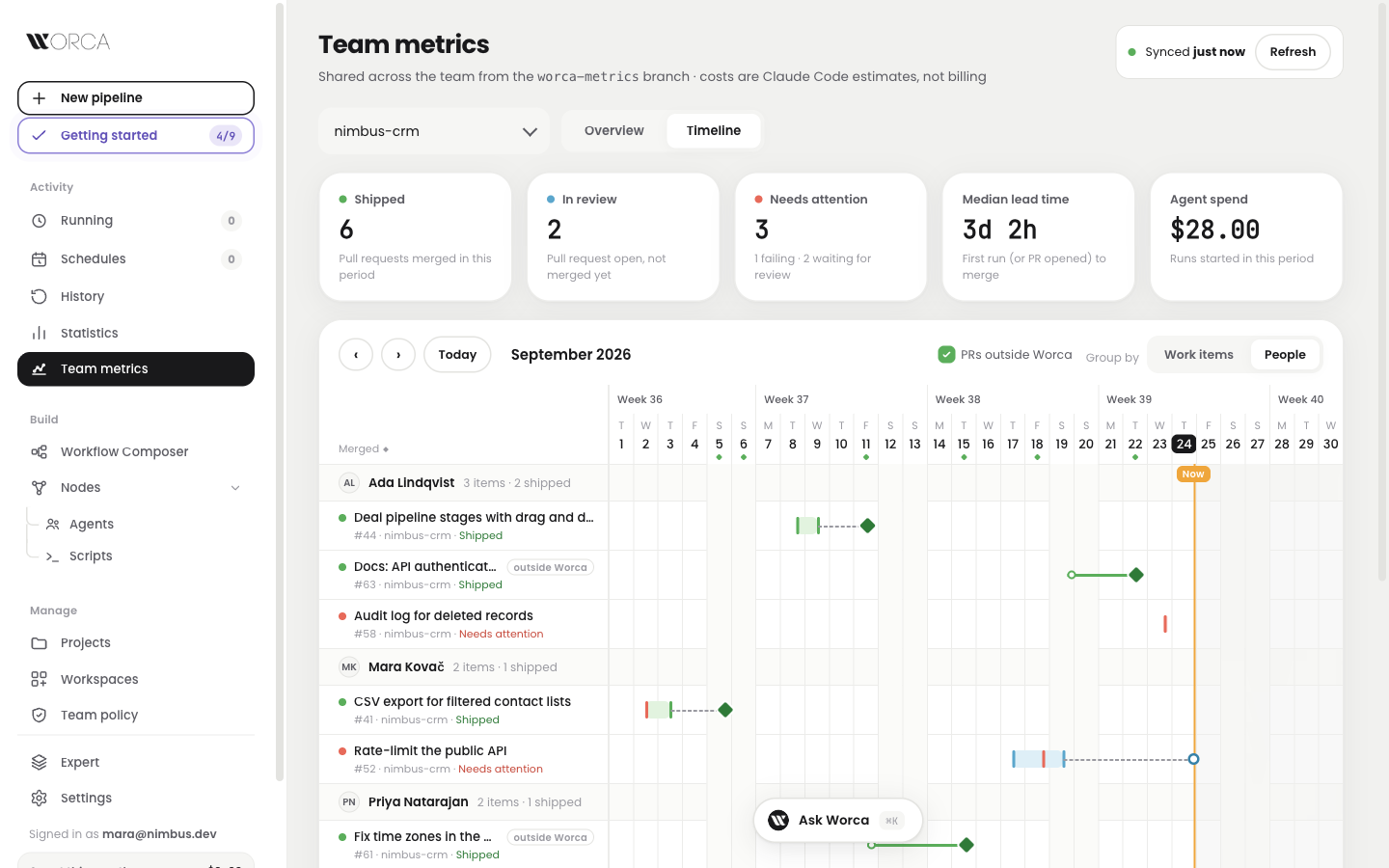
Now the Timeline shows every pull request in the repository, tagged outside Worca. Group by people, and each person is one row, even when they commit from two email addresses.
tagged outside Worcaone switch hides themone person, two emailsno email address stored
Timeline grouped by people — Ada, Mara and Priya, each with their Worca work and their pull requests made outside Worca

Grouped by people: Worca runs and pull requests made elsewhere, side by side.

Two email addresses, one person

Priya Natarajan · work laptop

Merge duplicate contacts on import · same person

Priya Natarajan · home laptop

Fix time zones in the activity feed · same person

Same git name, so one row. A GitHub login never joins two people.

Hosting

Share one Worca with your team.

Want the whole team on one Worca, not on five laptops?
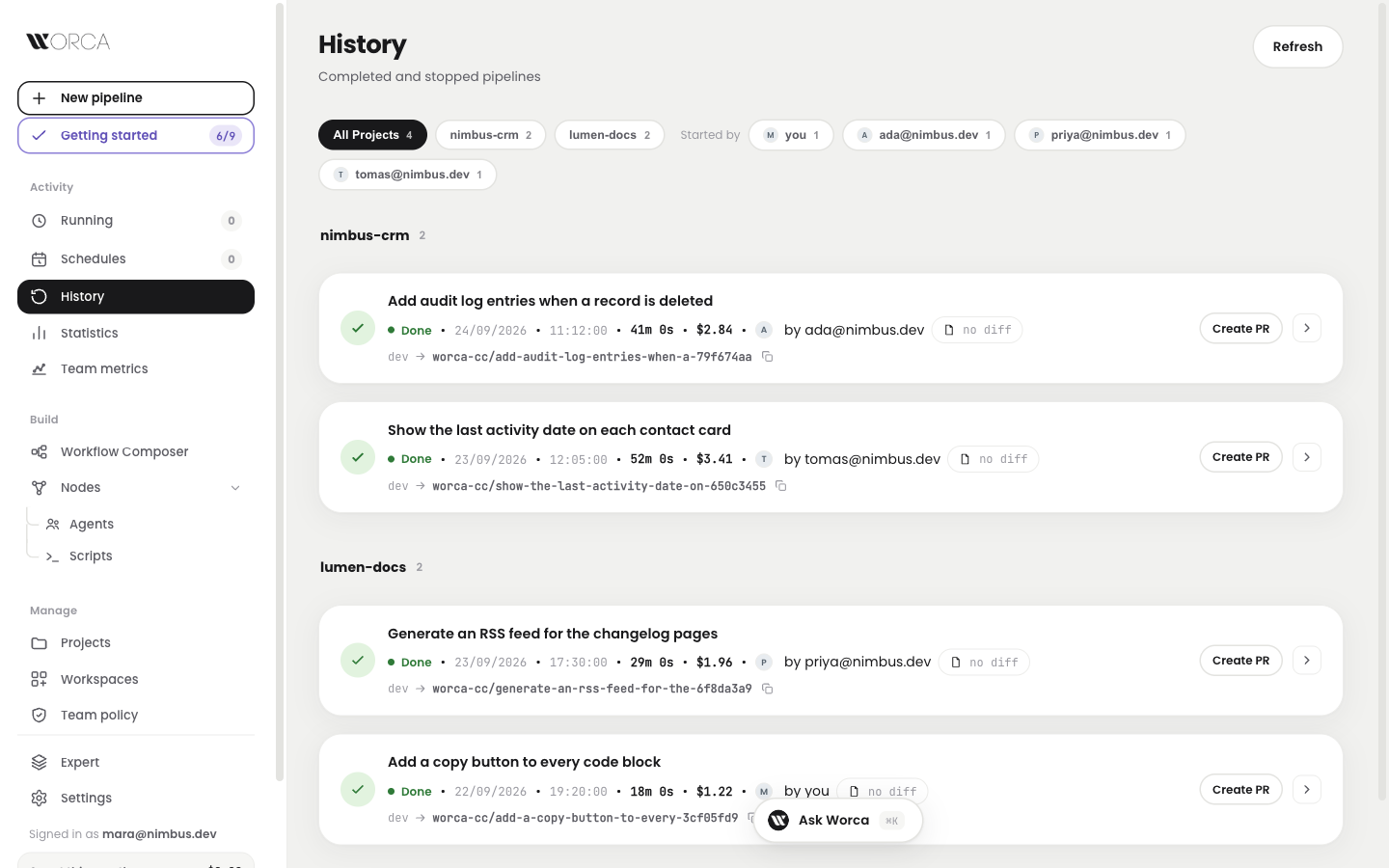
Now Worca can run on a server behind a sign-in. Every run, pause, answer and pull request records who did it, and agents never see the team's GitHub credentials.
sign-in with Cloudflare Accesswho started, paused, approveda fresh GitHub token per pushnothing changes on a laptop
What agents can no longer see
Your GitHub tokenHIDDEN — removed from every agent
The GitHub App keyHIDDEN — only Worca signs with it
Worca's settings and databaseNO ACCESS — agents run as their own user
Pushes and pull requests still worktoken per call · ✓
History on a shared Worca — each run says who started it, with a Started by filter

History on a shared Worca: who started each run, and a filter by person.

Projects

Clone a repository as a project.

No folder to pick when Worca runs on a server?
Now paste a repository URL. Worca clones it into its projects folder with the deployment's GitHub access and adds it, from the UI, the command line or Ask Worca.
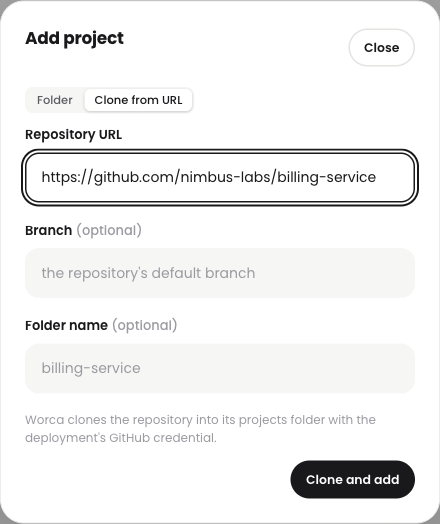
paste a URL, get a projectnever overwrites a folderlimit it to your reposbig clones keep going
Add project dialog, Clone from URL tab, with a repository URL filled in

Add project: a second tab, and the default when there is no folder picker.

From a link to a project
nimbus-labs/billing-serviceCloning
receiving files…branch: main
billing-service is in Projects, ready for a run
  1. 1Paste the repository URL
  2. 2Worca clones it on the server
  3. 3The project is ready to run
Install

Run Worca in a container.

Rather not give agents your whole laptop?
Now Worca and every agent it starts can run inside a disposable Linux container. One command sets it up; add-ons lock down the network, lend your SSH key or open it to the team.

1 command to set upIntel and Apple siliconsigned imagesruns on Railway
Set up once, then run
$ worca container init --projects ~/dev
$ worca container up
$ worca container login
$ worca container run -- --prompt "…"

Your projects are mounted; your home folder is not.

Add-ons you can stack
The boxalwaysno host access
Network allowlistadd-ononly hosts you list
SSH agentadd-onthe socket, not the key
Team accessadd-onbehind a sign-in

Hosting it? One guide and one tool cover upgrades, rollback and checks.

Models

More Copilot models, and Opus 5 again.

Some Copilot models only work with OpenAI's newer API?
Now the Model Bridge speaks that API too, so those models run your pipelines like any other. Opus 5 is back in the list next to Opus 5.5.

picked automatically on importreasoning kept across tool callsOpus 5 and 5.5 side by side
Which API a Copilot model uses
Claude Sonnet 5Anthropic, as is
GPT-5 CodexChat completionsResponses API

Copilot serves it only there, so import picks it

In the model picker
Claude Opus 5.5defaultfirst in the list
Claude Opus 5backits own prices

A shell set up for Vertex or Bedrock no longer breaks bridged models.

And the receipts

Shipped, tested, verified live.

7,529
Tests green35 new suites · +6,111 test lines
+16.3k
Lines landed190 files · 16 commits
8
PRs mergedsince v1.4.0 · 1 day
13/13
Verified livea hosted Worca · sign-in, isolation, GitHub
4
Signed imagesslim and full · Intel and Apple silicon
v39
Who did what, recorded4 schema steps · runs, pauses, answers
WORCA · changelog · v1.4.0 → v1.5.0 Sep 23 – Sep 24, 2026